
Losing important files can happen in seconds. Whether it’s a hardware failure, accidental deletion, ransomware attack, or a failed Windows update, having a reliable backup solution is essential. EaseUS Todo Backup is one of the most popular backup and recovery tools available, promising an easy way to protect your data without requiring advanced technical knowledge.
But with several backup solutions on the market, is EaseUS Todo Backup still worth using in 2026?
In this review, we’ll examine its features, performance, pricing, advantages, disadvantages, and who it’s best suited for to help you decide if it’s the right backup software for your needs.
VisionTechHQ Quick Verdict
Rating: ★★★★☆ (4.6/5)
EaseUS Todo Backup is a reliable and beginner-friendly backup solution that makes protecting your files, system, and important data straightforward. It offers a wide range of backup options, including full system backups, disk cloning, incremental backups, and cloud backup support, all through an intuitive interface.
While some advanced features require a paid plan and there are free alternatives available, EaseUS Todo Backup stands out for its ease of use, dependable performance, and comprehensive backup capabilities. For home users, students, professionals, and small businesses looking for an all-in-one backup solution, it’s a strong choice in 2026.
What Is EaseUS Todo Backup?
EaseUS Todo Backup is a backup and disaster recovery software developed by EaseUS, a company known for creating data management and recovery solutions for Windows and macOS. The software is designed to help users protect important files, operating systems, applications, and entire hard drives by creating secure backups that can be restored if something goes wrong.
Whether your computer experiences a hardware failure, accidental file deletion, malware infection, or an unsuccessful system update, EaseUS Todo Backup allows you to recover your data without starting from scratch. The software supports several backup methods, including full, incremental, differential, and scheduled backups, making it suitable for both personal and professional use.
In addition to backups, EaseUS Todo Backup includes disk cloning tools that make it easier to migrate from an old hard drive to a new HDD or SSD without reinstalling Windows or your applications. This feature is especially useful for users upgrading their computers or replacing failing storage drives.
With its straightforward interface and flexible backup options, EaseUS Todo Backup is suitable for beginners who want a simple way to protect their data, as well as more experienced users who need greater control over backup schedules and recovery options.
Key Features
EaseUS Todo Backup includes a range of features designed to protect your data and simplify recovery when things go wrong. Here are the features that stand out the most.
System Backup
One of the software’s strongest features is its ability to create a complete backup of your Windows operating system. If your PC crashes, becomes infected with malware, or fails to boot after an update, you can restore your system to a previous working state instead of reinstalling everything from scratch.
File and Folder Backup
If you only want to protect specific documents, photos, videos, or work files, EaseUS Todo Backup lets you choose exactly what to back up. This saves storage space and makes restoring individual files much easier than recovering an entire system image.
Disk and Partition Backup
The software can create backups of entire hard drives or individual partitions. This is particularly useful if you have multiple drives or want to safeguard all the data on a specific storage device.
Disk Cloning
EaseUS Todo Backup allows you to clone an HDD or SSD to another drive. This makes upgrading to a larger or faster SSD much simpler, as you can transfer your operating system, applications, and files without reinstalling Windows.
Scheduled Backups
Instead of remembering to create backups manually, you can schedule them to run automatically on a daily, weekly, or monthly basis. Regular automated backups reduce the risk of losing important data because of human error.
Incremental and Differential Backups
Rather than creating a full backup every time, the software supports incremental and differential backups. These methods save time and storage space by backing up only the data that has changed since the previous backup.
Recovery Options
When data loss occurs, EaseUS Todo Backup provides several recovery options, from restoring individual files to recovering an entire system. This flexibility makes it useful for both everyday users and those dealing with more serious system failures.
Pros & Cons
No software is perfect, and EaseUS Todo Backup is no exception. While it offers a comprehensive set of backup and recovery tools, there are a few limitations worth considering before making a decision.
Pros
- ✅ Clean and beginner-friendly interface that’s easy to navigate.
- ✅ Supports full system, disk, partition, and file backups.
- ✅ Automatic backup scheduling helps keep data protected with minimal effort.
- ✅ Disk cloning makes upgrading to a new SSD or HDD much easier.
- ✅ Flexible recovery options allow you to restore individual files or an entire system.
- ✅ Available for both home users and businesses with different licensing options.
Cons
- ❌ Several advanced features are only available in the paid version.
- ❌ The first full backup can take a considerable amount of time, especially on large drives.
- ❌ Some competing backup solutions include certain features at a lower price.
- ❌ New users may need a little time to understand the different backup types, such as full, incremental, and differential backups.

Our Take
EaseUS Todo Backup gets the fundamentals right. It offers the tools most people need to protect their data, and it presents them in a way that’s approachable for beginners. However, if you’re expecting every feature to be available for free, you may be disappointed. The paid version unlocks the software’s full potential, so whether it’s worth the cost depends on how important your data is and how often you rely on backups.
Performance & User Experience
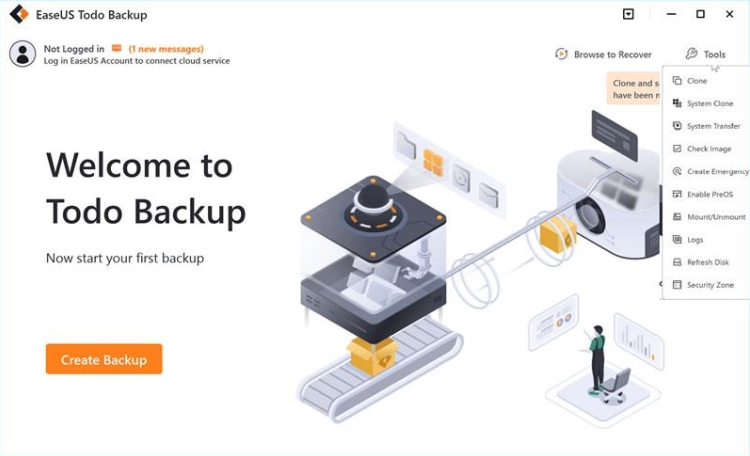
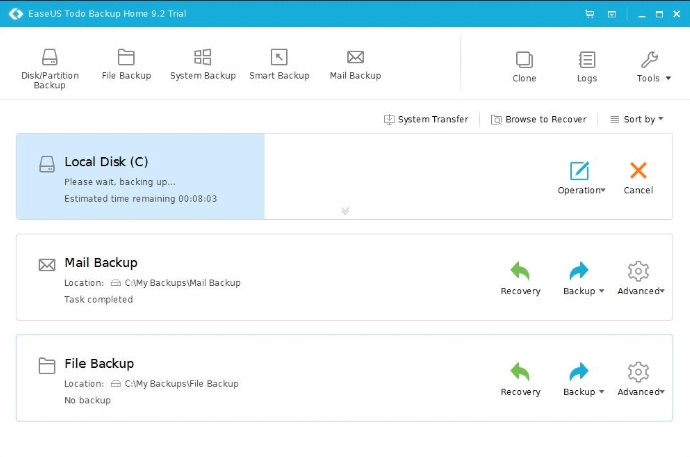
EaseUS Todo Backup is designed with simplicity in mind, and that’s immediately noticeable when you launch the software. The interface is clean, well-organized, and doesn’t overwhelm new users with technical jargon. Most core functions such as creating a backup, restoring files, or cloning a drive are clearly labelled and easy to access.
Creating a backup is generally a straightforward process. The software guides you through selecting what you want to protect, choosing a destination, and configuring options such as scheduling or encryption where available. Even users with little experience using backup software should be able to create their first backup without much difficulty.
Performance largely depends on the amount of data being backed up and the speed of your storage device. Smaller backups complete relatively quickly, while the initial backup of an entire system or large hard drive can take considerably longer. After that, incremental or differential backups are usually much faster because they only save changes made since the previous backup.
During normal use, the software remains responsive and doesn’t feel overly complicated. Scheduled backups also run automatically in the background, reducing the need for manual intervention. However, like most backup applications, you may notice increased disk activity while a backup is actively running, particularly on older computers.
Overall, EaseUS Todo Backup delivers a reliable user experience. It focuses on making backups accessible rather than offering an interface packed with advanced technical controls, which will appeal to most home users and small businesses.
Pricing
EaseUS Todo Backup offers both free and paid versions, giving users the flexibility to choose a plan that matches their needs and budget.
The free version includes essential backup features, making it a good starting point for users who want basic file and system protection without spending money. It’s suitable for occasional backups and everyday personal use.
For users who need more advanced functionality, EaseUS also offers paid plans that unlock additional features such as enhanced backup options, system cloning capabilities, priority technical support, and other tools aimed at professionals and businesses. The exact features available depend on the plan you choose.
Since pricing and promotions can change throughout the year, it’s a good idea to check the official EaseUS website for the latest plans, discounts, and subscription options before making a purchase.
Is the Paid Version Worth It?
If you only need basic backups for personal files, the free version may be enough. However, if you regularly back up important work, manage multiple computers, or want access to the software’s full feature set, upgrading to a paid plan may provide better value and additional peace of mind.
As with any software purchase, it’s worth comparing the features included in each plan to determine whether the extra functionality justifies the cost for your specific needs.
Want to see the latest pricing or current promotions?
Who Should Buy It?
EaseUS Todo Backup is a good choice for users who want a reliable and easy-to-use backup solution without needing advanced technical knowledge. Its straightforward interface and flexible backup options make it suitable for a wide range of users.
You should consider EaseUS Todo Backup if you:
- ✔️ Want to protect important documents, photos, videos, or personal files from accidental loss.
- ✔️ Need regular system backups to recover from hardware failures, malware attacks, or failed Windows updates.
- ✔️ Plan to upgrade your computer’s hard drive or SSD and want to clone your existing drive.
- ✔️ Prefer automatic scheduled backups instead of remembering to back up files manually.
- ✔️ Run a small business or work from home and need a dependable way to safeguard important data.
It may not be the best choice if you:
- ❌ Only need occasional backups of a few files and don’t require advanced backup features.
- ❌ Are looking for a completely free solution with no feature restrictions.
- ❌ Need enterprise-level backup management for large organizations with complex IT environments.
Our Recommendation
EaseUS Todo Backup strikes a good balance between ease of use and functionality. It won’t be the perfect solution for every user, but for most home users, students, remote workers, and small businesses, it offers the features needed to keep important data protected. If reliable backups are something you’ve been putting off, it’s a solution that’s worth considering.
Final Verdict
EaseUS Todo Backup earns its reputation as one of the more accessible backup solutions available today. It combines an easy-to-use interface with a solid set of backup and recovery tools, making it suitable for users who want dependable protection without a steep learning curve.
While the free version covers basic backup needs, users who require advanced features or more flexibility may find the paid plans a worthwhile investment. Like most backup software, it isn’t perfect, and some competing products may offer better value depending on your specific requirements. However, EaseUS Todo Backup delivers where it matters most: helping users protect their data and recover from unexpected problems.
If you’re looking for backup software that’s straightforward, reliable, and suitable for everyday use, EaseUS Todo Backup is a strong option to consider. It may not be the ideal choice for every situation, but it provides a good balance of usability and functionality for most home users, students, professionals, and small businesses.
VisionTechHQ Rating
| Category | Rating |
| Ease of Use | ⭐⭐⭐⭐⭐ (5/5) |
| Features | ⭐⭐⭐⭐⭐ (5/5) |
| Performance | ⭐⭐⭐⭐☆ (4.5/5) |
| Value for Money | ⭐⭐⭐⭐☆ (4/5) |
| Overall Rating | ⭐⭐⭐⭐☆ (4.6/5) |
If EaseUS Todo Backup seems like the right fit for your backup needs, you can check the latest pricing and download it from the official website below.
Frequently Asked Questions (FAQ)
Is EaseUS Todo Backup free?
Yes. EaseUS Todo Backup offers a free version that includes essential backup features for personal use. However, some advanced tools and capabilities are only available through the paid plans.
Can EaseUS Todo Backup create a full system backup?
Yes. The software allows you to create a complete system image, making it possible to restore your operating system, installed applications, and settings if your computer experiences a major failure.
Does EaseUS Todo Backup support automatic backups?
Yes. You can schedule backups to run automatically on a daily, weekly, or monthly basis, helping ensure your important files stay protected without requiring manual backups.
Can I clone my hard drive with EaseUS Todo Backup?
Yes. EaseUS Todo Backup includes disk cloning features that allow you to migrate your operating system and data from one hard drive or SSD to another, which is useful when upgrading your storage.
Is EaseUS Todo Backup suitable for beginners?
Yes. One of the software’s strengths is its user-friendly interface. Most backup tasks are straightforward, making it a practical option for users with little or no experience using backup software.
Is EaseUS Todo Backup worth it in 2026?
For users looking for reliable backup software with an easy-to-use interface, EaseUS Todo Backup remains a strong option in 2026. While the free version is suitable for basic backups, users who need more advanced features may find the paid plans offer better value.
Leave a Reply