
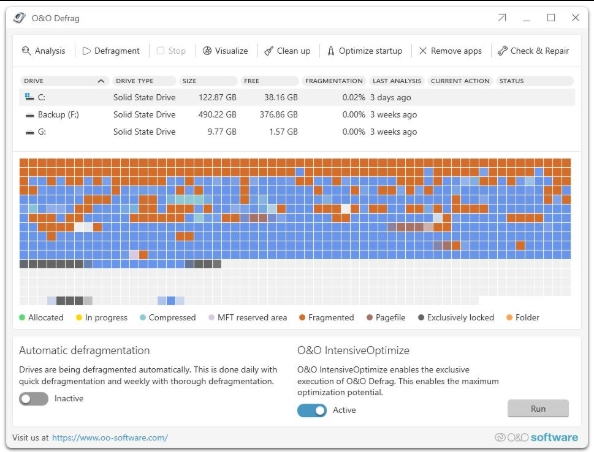
Over time, files can become fragmented across a storage drive, particularly on traditional hard disk drives (HDDs). Windows includes its own drive optimization tools, but some users may want more control over how their drives are analyzed and optimized.
O&O Defrag is a Windows optimization program from German software developer O&O Software that focuses on drive defragmentation and optimization. The current release, O&O Defrag 31, also includes tools for areas such as boot-time optimization, startup management, drive analysis, and system maintenance.
But does it actually offer enough over Windows’ built-in tools to justify using a dedicated application?
In this review, we’ll look at O&O Defrag’s features, usability, performance-related capabilities, pricing, and limitations to determine who it’s really worth considering in 2026.
Quick VisionTech Verdict
| Category | Rating |
|---|---|
| Reliability | ★★★★☆ |
| Ease of Use | ★★★★☆ |
| Features | ★★★★★ |
| Value for Money | ★★★★☆ |
| Overall Rating | ★★★★☆ |
Best For: Windows users who want more control over drive optimization and additional system-maintenance tools beyond Windows’ built-in drive optimization.
Bottom Line: O&O Defrag 31 is a feature-rich Windows optimization tool that goes well beyond basic defragmentation, but its value depends largely on whether you actually need those additional controls and utilities.
What Is O&O Defrag?
O&O Defrag is a Windows drive optimization and system maintenance program developed by O&O Software GmbH, a German software company that specializes in Windows utilities. The current release is O&O Defrag 31, which was released in March 2026.
At its core, O&O Defrag is designed to analyze and optimize the way data is arranged on a computer’s storage drives. For traditional hard disk drives (HDDs), this includes conventional defragmentation, which reorganizes fragmented files so that related data can be stored more efficiently. For SSDs and NVMe drives, O&O uses different optimization procedures rather than treating them like traditional mechanical hard drives. The software can automatically detect the drive type and apply the appropriate approach.
However, O&O Defrag 31 is broader than its name might suggest. Alongside its drive-optimization functions, it includes tools such as O&O IntensiveOptimize for optimizing locked system files in an isolated Windows environment, Boot Time Optimization, O&O StartupManager, O&O DiskCleaner, O&O AppBuster, O&O Check&Repair, and drive-health monitoring based on S.M.A.R.T. data.
Version 31 also introduced a redesigned interface and native support for Windows PCs using ARM processors, alongside existing support for Intel and AMD systems. O&O says the underlying technology was also rebuilt for improved efficiency and stability.
In simple terms, O&O Defrag is aimed at Windows users who want more control over drive optimization and system maintenance than the basic tools built into Windows provide. Its extensive feature set can be useful for users who want granular control, automation, and additional utilities in one application, although not every Windows user will need everything it offers.
Key Features
O&O Defrag 31 is more than a basic defragmentation utility. Alongside its core drive-optimization tools, it includes automation, SSD and NVMe optimization, boot-time optimization, drive-health monitoring, and several additional Windows maintenance utilities. Here are the features that matter most.
Automatic Drive Optimization
O&O Defrag can automatically detect whether a drive is an HDD or SSD and use an optimization procedure appropriate for that type of storage. Traditional HDDs can be defragmented, while SSDs and NVMe drives use SSD-oriented optimization procedures designed to avoid unnecessary write activity.
This is useful for users who don’t want to manually decide when or how their drives should be optimized. You can also configure optimization separately for different drives.
Multiple Defragmentation Methods
Rather than offering just one defragmentation process, O&O Defrag provides several optimization strategies for different situations. These can reorganize fragmented files, consolidate free space, and arrange files according to the selected optimization method.
The benefit is greater control for experienced users, although most beginners will probably be better off allowing the software’s automatic settings to handle the process.
Automatic Background Optimization
O&O Defrag can run in the background and begin optimization when the computer is idle. Users can also create schedules and configure individual time windows for drives.
The software can pause optimization when the computer becomes active, while its resource-management options are designed to keep CPU and input/output usage under control.
For someone who wants a “set it and forget it” approach, this is one of the more practical features.
Boot Time Optimization and O&O IntensiveOptimize
Some Windows files cannot be optimized while the operating system is running because they are in use. O&O Defrag addresses this with Boot Time Optimization, which can optimize certain locked system files before Windows starts.
The software also includes O&O IntensiveOptimize, which works in an isolated Windows environment to access and optimize files that cannot normally be modified while Windows is running. O&O states that both technologies support BitLocker-encrypted system drives.
These tools are more relevant to advanced users or systems where normal optimization cannot address particular files.
SSD and NVMe Support
O&O Defrag 31 supports modern SSD and NVMe storage in addition to traditional hard drives. The software can automatically identify the type of drive and apply the corresponding optimization approach.
That’s important because SSDs should not simply be treated like mechanical hard drives. The software’s SSD-focused tools are intended to optimize storage without unnecessarily applying conventional HDD-style defragmentation.
Drive Health Monitoring
O&O Defrag includes drive-health monitoring based on S.M.A.R.T. data. This can provide information about the health status of supported HDDs, SSDs, and RAID configurations and alert users when the drive reports potential problems.
It’s a useful addition, although it shouldn’t be treated as a replacement for a proper backup strategy or dedicated hardware-diagnostic tools.
O&O StartupManager
Version 31 includes O&O StartupManager, which provides an overview of programs, tasks, and services that start with Windows. Users can then decide which items should remain enabled or be disabled.
This can be useful when a Windows PC has accumulated unnecessary startup items and takes longer to become usable after booting.
O&O DiskCleaner and O&O AppBuster
O&O Defrag 31 also includes additional Windows-maintenance utilities.
O&O DiskCleaner can identify and remove temporary and redundant files, while O&O AppBuster can help remove unwanted desktop and Microsoft Store applications.
These features broaden the software beyond defragmentation, although users who already have preferred cleanup and uninstall tools may find some of this functionality unnecessary.
O&O Check&Repair
The Check&Repair tool can scan storage and Windows system components for inconsistencies and, where supported, repair detected problems.
This makes the feature useful as a basic maintenance tool, but it should not be confused with a complete Windows recovery or troubleshooting solution.
Modern and Classic Interfaces
O&O Defrag 31 introduced a redesigned interface while retaining a Classic view for users who want access to more advanced settings. The newer Modern interface is designed around a simpler, more straightforward experience.
That two-view approach is a sensible addition because beginners can stick with the simplified interface while experienced users can still access more detailed controls.
O&O VisualDisk and DriveLED
Two smaller but useful tools are O&O VisualDisk and O&O DriveLED.
VisualDisk provides a visual representation of write activity on SSD and NVMe storage, while DriveLED displays drive activity directly in the Windows taskbar.
They aren’t essential features for most users, but they can make storage activity easier to understand and monitor.
The Bigger Picture
The main selling point of O&O Defrag 31 isn’t simply that it can defragment a drive. Windows already provides basic drive-optimization functionality. O&O’s advantage is the combination of automated optimization, advanced defragmentation methods, SSD/NVMe handling, boot-time optimization, drive-health monitoring, and additional Windows maintenance tools in one application.
Whether that broader feature set is worth paying for will ultimately depend on how much control and automation a particular user actually needs.
Pros and Cons
Pros
- Extensive optimization controls — O&O Defrag 31 provides considerably more control than a basic defragmentation utility, including multiple optimization methods, automatic scheduling, threshold-based optimization, and options for different types of storage.
- Supports modern storage — The software supports HDDs as well as SSD and NVMe drives, with different optimization approaches depending on the storage type.
- Useful system-maintenance tools — Features such as O&O StartupManager, DiskCleaner, AppBuster, Check&Repair, DriveLED, and VisualDisk make the application more than a standalone defragmenter.
- Boot-time optimization — O&O Defrag can address certain files that cannot be optimized while Windows is running, giving advanced users another level of control.
- Works with Windows on ARM — Version 31 added native support for Windows PCs using ARM processors alongside Intel and AMD systems.
- Modernized interface — Version 31 introduced a redesigned interface while retaining a Classic view for users who prefer more advanced controls.
Cons
- May be more software than many users need — Windows already includes its own drive-optimization functionality. For someone who simply wants basic automatic drive maintenance, O&O Defrag’s larger feature set may not justify installing a separate application.
- The extensive controls can be unnecessary for beginners — Having multiple optimization methods, schedules, thresholds, and advanced tools provides flexibility, but it can also make the product more complicated than a simple built-in Windows utility.
- Not available in many languages — O&O’s current FAQ lists English and German as the available languages for the international versions.
- Some features are aimed at advanced users — Tools such as boot-time optimization and O&O IntensiveOptimize are useful in specific situations, but they’re unlikely to matter to someone looking for straightforward drive maintenance.
- A dedicated defragmenter isn’t automatically necessary for every PC — The usefulness of third-party optimization software depends heavily on the type of storage and how much additional control the user actually wants. O&O Defrag is therefore better viewed as a feature-rich optimization suite rather than an essential Windows utility.
Performance & User Experience
O&O Defrag 31 received a significant overhaul compared with previous versions. O&O says the underlying engine was redesigned to deliver faster processing and greater stability, while the interface was also rebuilt to make the software easier to navigate.
However, there is an important distinction here: VisionTechHQ has not independently benchmarked O&O Defrag 31, so we are not going to claim specific speed improvements or performance gains as if we measured them ourselves.
Interface and Navigation
The biggest immediately noticeable change in version 31 is the redesigned interface. O&O now offers two interface modes: Modern and Classic.
The Modern view is aimed at users who want a simpler, more straightforward experience. O&O describes it as a streamlined option for users who prefer a “set-and-forget” approach. The Classic view retains more of the detailed controls intended for experienced users.
That is a sensible approach. Someone who simply wants automatic optimization does not necessarily need to understand every available defragmentation method, while advanced users can still access the additional controls when they need them.
Setup and Ease of Use
Getting started is relatively straightforward. After launching O&O Defrag 31, the software can analyze the system and recommend settings for the available drives. Users can then enable automatic optimization or configure their own methods and schedules.
This makes the software accessible to less experienced users without completely removing the control that more advanced users may want.
The main learning curve comes from the sheer number of options. O&O Defrag isn’t difficult to operate at a basic level, but users who start exploring its optimization methods, schedules, offline optimization, and additional utilities will have more to learn than they would with Windows’ built-in optimization tool.
Resource Usage
O&O provides several options intended to reduce the impact of optimization on normal computer use. These include low-priority defragmentation, CPU and I/O load management, automatic pausing when the user becomes active, and the option to disable optimization while the computer is running on battery power.
These controls are particularly useful for laptops and computers that need to remain usable while background maintenance is taking place.
That said, actual resource consumption will depend on the drive, system configuration, optimization task, and other activity taking place on the computer. We therefore would not attach a specific CPU, RAM, or disk-usage figure to O&O Defrag without controlled testing.
Reliability and Stability
O&O says the underlying technology in version 31 was comprehensively revised to improve performance and stability. The company also states that O&O Defrag uses Windows file-system interfaces when moving files, which it describes as making optimization fundamentally safe.
For important data, however, normal backup precautions still apply. O&O itself recommends keeping an up-to-date backup of important files, particularly because unexpected interruptions can occur during any disk operation.
HDD and SSD Experience
The software’s approach differs depending on the type of storage being optimized. O&O Defrag automatically identifies HDDs and SSDs and applies different procedures, including SSD-optimized processes intended to avoid unnecessary write operations.
This is important because modern computers increasingly use SSDs rather than traditional mechanical hard drives. A third-party optimizer that simply treated every drive like an HDD would be difficult to recommend.
O&O Defrag also supports NVMe storage and provides tools such as VisualDisk for visualizing write activity on SSD and NVMe drives.
Overall User Experience
The overall experience is best described as flexible rather than minimalistic.
A beginner can use the Modern interface and allow automatic optimization to handle most of the work. More experienced users can switch to Classic mode and access additional settings, optimization methods, and scheduling controls.
That flexibility is one of O&O Defrag’s strongest points, but it also highlights an important question for potential buyers: do you actually need this level of control?
For someone who simply wants Windows to maintain their drives automatically, O&O Defrag may provide more functionality than necessary. For users who want detailed control over drive optimization and additional maintenance tools in one application, the broader feature set becomes much more useful.
Our Performance Take
O&O Defrag 31 appears to have made meaningful changes to its underlying technology and user interface, and its resource-management options are useful additions. However, we would not claim that it makes a specific computer “X% faster” or that it delivers a particular performance improvement without our own controlled testing.
That distinction matters. A trustworthy review should separate what the developer claims from what we have actually verified.
Pricing
O&O Defrag 31 is commercial software, but O&O provides a 30-day trial of the Professional Edition so users can test the program before deciding whether to purchase it.
The current consumer product is the Professional Edition, while O&O also offers a separate Server Edition designed for Windows servers and business environments. The two editions are aimed at different types of users, so a typical home user or individual workstation does not need the Server Edition.
Professional Edition
The Professional Edition is intended for private users and individual workstations, including workstations used within businesses. It provides the core drive-optimization functionality along with the additional maintenance and automation features covered earlier in this review.
O&O’s current website provides the option to purchase the software and also offers the 30-day trial. Because pricing can change, we recommend checking the official O&O store for the current price immediately before purchasing rather than relying on an older advertised figure.
Server Edition
The Server Edition is designed specifically for Windows servers and includes additional management and operating features for professional environments. O&O lists support for Windows Server 2016, 2019, 2022, and 2025, in addition to Windows 10 and Windows 11.
For the average home user, however, paying for the Server Edition would make little sense. The Professional Edition is the relevant version for individual PCs and normal workstation use.
Is O&O Defrag Worth Paying For?
This is where the pricing question becomes more complicated than simply looking at the license cost.
Windows already includes its own drive-optimization functionality, so users who only need basic automatic maintenance may have little reason to pay for a third-party defragmentation program.
O&O Defrag becomes more interesting for users who specifically want more optimization methods, detailed scheduling and automation, boot-time optimization, SSD/NVMe-specific tools, drive-health monitoring, and additional Windows maintenance utilities in one application. O&O itself positions these additional capabilities as key differences from the standard Windows solution.
The 30-day trial is therefore useful. Rather than buying the software based solely on its feature list, users can determine whether its additional controls and utilities actually provide value on their own PC.
Pricing Verdict
O&O Defrag is not a necessary purchase for every Windows user. Its value comes from the additional control and maintenance features it provides beyond Windows’ built-in tools. If you only want basic drive optimization, the free Windows utility may be sufficient. If you want a dedicated optimization suite with considerably more control, the trial gives you a reasonable way to decide whether the paid version is worthwhile.
Who Should Use O&O Defrag?
O&O Defrag 31 isn’t aimed at every Windows user. Its usefulness depends largely on how much control you want over drive optimization and whether you will actually use its additional maintenance tools.
Home Users Who Want More Control
O&O Defrag can make sense for home users who want more control than Windows’ built-in drive optimization provides.
The software offers automatic background optimization, scheduling, different optimization methods, drive analysis, and additional system-maintenance tools. That makes it possible to configure how and when maintenance happens rather than simply relying on Windows’ default settings.
For someone who enjoys managing their PC and wants those controls in one application, O&O Defrag is a reasonable option.
Users With Traditional Hard Drives
O&O Defrag is particularly relevant to PCs that still use mechanical HDDs.
Fragmentation is a genuine characteristic of file systems, and O&O provides several ways to analyze and optimize fragmented data. It also offers boot-time optimization for files that cannot be accessed while Windows is running.
However, owning an HDD alone doesn’t automatically mean you need O&O Defrag. Windows already has its own optimization functionality, so the main question is whether O&O’s additional controls are useful to you.
Users With SSDs or NVMe Drives
O&O Defrag also supports SSD and NVMe storage and provides storage-specific optimization rather than simply treating flash storage like a conventional HDD. Its VisualDisk feature can also display write operations on SSD and NVMe drives.
That makes it suitable for modern PCs too, although users with SSD-only systems should have realistic expectations. Installing a third-party optimizer doesn’t automatically mean your computer will become dramatically faster.
Advanced Windows Users
This is probably where O&O Defrag makes the most sense.
The software gives experienced users access to detailed optimization settings, scheduling, offline and boot-time optimization, resource controls, and additional utilities such as StartupManager, DiskCleaner, and Check&Repair.
If you want to fine-tune how Windows storage maintenance works, O&O Defrag gives you considerably more to work with than a basic Windows utility.
Users Who Want Multiple Maintenance Tools in One Application
O&O Defrag 31 includes several tools beyond its core optimization functions, including StartupManager, AppBuster, DiskCleaner, Check&Repair, DriveLED, and VisualDisk.
This can be convenient if you would rather have several maintenance functions available from one application instead of installing separate utilities.
Who May Not Need O&O Defrag?
O&O Defrag probably isn’t necessary for users who simply want Windows to maintain their storage automatically.
If your PC is already working well and you’re happy with Windows’ built-in drive optimization, paying for a third-party application may provide little practical benefit.
It’s also not something we would recommend buying solely because you expect it to transform an otherwise slow computer. Storage optimization is only one part of overall PC performance, and a slow processor, insufficient RAM, failing hardware, or other software problems won’t necessarily be solved by defragmentation.
Our Take
O&O Defrag is best suited to Windows users who want more control, automation, and maintenance functionality than Windows provides by default.
For everyone else, the built-in Windows tools may be enough, and that’s an important part of the decision. You shouldn’t pay for O&O Defrag simply because it has more features; those features need to be useful to you.
Final VisionTech Verdict
Is O&O Defrag Worth Using in 2026?
Yes — but mainly for users who will actually use its additional features.
O&O Defrag 31 is a capable and unusually feature-rich Windows drive-optimization application. It goes well beyond basic defragmentation with automatic optimization, multiple optimization methods, SSD and NVMe support, boot-time optimization, O&O IntensiveOptimize, drive-health monitoring, and a collection of additional Windows maintenance tools. The latest version also brings a redesigned interface and native support for Windows PCs using ARM processors.
The biggest strength is therefore control. Users can leave the software to handle optimization automatically, or switch to the Classic interface and access more advanced settings. The integrated tools also make O&O Defrag more of a general Windows maintenance suite than a simple defragmenter.
The biggest weakness is also fairly straightforward: many users simply won’t need all of this.
Windows already provides built-in drive optimization, so someone looking for basic automatic maintenance may have little reason to install and pay for a third-party solution. O&O Defrag makes more sense when you specifically want greater control, more detailed optimization options, additional monitoring, or several maintenance tools in one application.
It’s also important not to expect the software to magically fix every slow PC. Drive optimization is only one part of overall system performance. A computer with an aging processor, limited memory, a failing drive, or other underlying problems will not necessarily become fast simply because its storage has been optimized.
We also haven’t independently benchmarked O&O Defrag 31, so we aren’t going to attach a specific percentage improvement to its performance. O&O states that the new version has a substantially revised engine designed to improve speed, efficiency, and stability, but those are the developer’s claims rather than VisionTechHQ benchmark results.
Who Should Use It?
O&O Defrag 31 is worth considering if you:
- Want more control over Windows drive optimization.
- Still use traditional HDD storage.
- Have a mixture of HDDs and SSDs/NVMe drives.
- Want automated optimization with detailed scheduling options.
- Need access to boot-time or offline optimization.
- Want additional Windows maintenance tools in the same application.
- Prefer having more advanced controls available when you need them.
Who Should Skip It?
You probably don’t need O&O Defrag if you:
- Are happy with Windows’ built-in drive optimization.
- Have no interest in manually controlling storage optimization.
- Expect a defragmenter to dramatically speed up an otherwise slow computer.
- Wouldn’t use the additional maintenance and monitoring tools.
Final Recommendation
O&O Defrag 31 is a good choice for Windows users who want a dedicated, feature-rich drive optimization and maintenance suite.
It isn’t an essential purchase for every PC, and that’s probably the most important thing to understand before buying it. Its value comes from the additional control and collection of tools rather than simply being able to defragment a drive.
If those features solve a problem you actually have, O&O Defrag 31 is worth considering. If all you want is basic drive optimization, Windows’ built-in tools may already be enough.
Overall VisionTechHQ Rating: 4/5 ★★★★☆
If O&O Defrag looks like the right fit for your PC, check the current trial and purchase options on the official O&O website before making a decision.
Frequently Asked Questions
Is O&O Defrag safe to use?
O&O Defrag is a Windows system-optimization application developed by O&O Software. Its documented functions include drive optimization, system maintenance, and drive-health monitoring. As with any software that performs operations on storage drives, keeping current backups of important data is recommended.
Is O&O Defrag free?
O&O Defrag 31 is commercial software, but O&O provides a 30-day trial that allows users to test the program before purchasing it. The current product page lists the Professional Edition at a promotional price of €29.90, reduced from €49.90, with no subscription. Pricing can vary by region and promotion, so readers should verify the price shown for their location before purchasing.
Does O&O Defrag work with Windows 11?
Yes. O&O Defrag 31 supports Windows 11 as well as Windows 10. Version 31 also introduced native support for Windows PCs using ARM processors, in addition to Intel and AMD systems.
Does O&O Defrag work with SSDs?
Yes. O&O Defrag supports SSD and NVMe drives and provides storage-specific optimization rather than simply applying traditional HDD defragmentation methods to every drive. It also includes O&O VisualDisk for visualizing write activity on SSD and NVMe storage.
Do I need O&O Defrag if Windows already has a defragmentation tool?
Not necessarily.
Windows already includes its own drive-optimization functionality, so users who only want basic automatic storage maintenance may not need a third-party application.
O&O Defrag is aimed more at users who want additional optimization methods, scheduling and automation, system-maintenance tools, drive-health monitoring, and greater control over how their drives are managed.
Can O&O Defrag make my PC faster?
It can optimize storage, but you shouldn’t expect it to automatically solve every performance problem.
O&O states that Defrag 31 is designed to improve system performance and has a redesigned optimization engine. However, the actual effect on an individual PC will depend on factors such as its hardware, storage type, drive condition, and workload.
A slow processor, insufficient RAM, failing hardware, or other Windows problems will not necessarily be fixed by drive optimization.
Does O&O Defrag defragment SSDs?
O&O Defrag does support SSDs, but SSD optimization is handled differently from conventional HDD defragmentation. The software automatically distinguishes between different storage types and applies the appropriate optimization procedures.
Does O&O Defrag include tools besides defragmentation?
Yes. O&O Defrag 31 includes several additional Windows-maintenance tools, including O&O DiskCleaner, O&O StartupManager, O&O Check&Repair, O&O DriveLED, and O&O VisualDisk. This is one of the main reasons the product is better described as a Windows optimization suite rather than simply a defragmenter.
Is O&O Defrag worth buying in 2026?
For some users, yes.
If you want detailed control over drive optimization and will use features such as automated optimization, advanced settings, system maintenance, or drive monitoring, O&O Defrag 31 can provide useful functionality beyond Windows’ built-in tools.
If you simply want basic drive optimization and your PC is already running normally, the built-in Windows tools may be sufficient and buying O&O Defrag may not be necessary.
Leave a Reply