

MindManager is a visual productivity and planning tool designed to help users organize ideas, information, tasks, and projects through mind maps, diagrams, flowcharts, timelines, Gantt charts, and other visual formats. The software is aimed at individuals, teams, and organizations that want to turn complex information into something easier to structure and work with.
Unlike a basic mind-mapping application, MindManager has expanded into areas such as project planning, task management, collaboration, knowledge organization, and integrations with tools including Microsoft Teams, SharePoint, and Jira.
But that broader feature set also raises an important question: does MindManager actually provide enough practical value to justify using or paying for it in 2026?
In this review, we’ll look at MindManager’s features, usability, collaboration capabilities, performance, pricing, strengths, weaknesses, and the types of users who are most likely to benefit from it.
Quick VisionTechHQ Verdict
| Category | Rating |
|---|---|
| Ease of Use | ★★★★☆ |
| Features | ★★★★★ |
| Collaboration | ★★★★☆ |
| Performance | ★★★★☆ |
| Value for Money | ★★★★☆ |
| Overall Rating | ★★★★☆ |
Best For: Professionals, project planners, teams, students, and anyone who needs to organize complex ideas, information, or projects visually.
Bottom Line: MindManager is a feature-rich productivity platform that goes well beyond basic mind mapping, but its broad feature set and paid plans make more sense for users who will actually use its planning and collaboration capabilities.
MindManager currently offers multiple diagram types and layouts, project planning and task management, Gantt charts, templates, multiple viewing modes, and collaboration features, although availability varies between plans and platforms.
Why We Rated It This Way
The 5/5 for Features is justified by the breadth of what MindManager can do: users can work with mind maps, flowcharts, timelines, Gantt charts, Kanban-style views, whiteboards, and other visual formats rather than being restricted to traditional mind maps.
The 4/5 for Ease of Use reflects a more nuanced point. MindManager is designed around visual organization, and its templates and different views can make complex information easier to structure. However, the sheer number of tools and options means it isn’t as straightforward as a lightweight mind-mapping application.
For Value for Money, the software can offer substantial functionality, but the value depends heavily on how much of the broader platform you actually need. MindManager has different plans with significant differences in features and platform access, so someone looking only for basic mind mapping may not get the same value as a project-oriented user.
VisionTechHQ assessment:
MindManager looks considerably more useful when treated as a visual planning and information-management tool rather than simply a mind-map creator. The rest of this review will determine whether that extra functionality is worth paying for.
What Is MindManager?
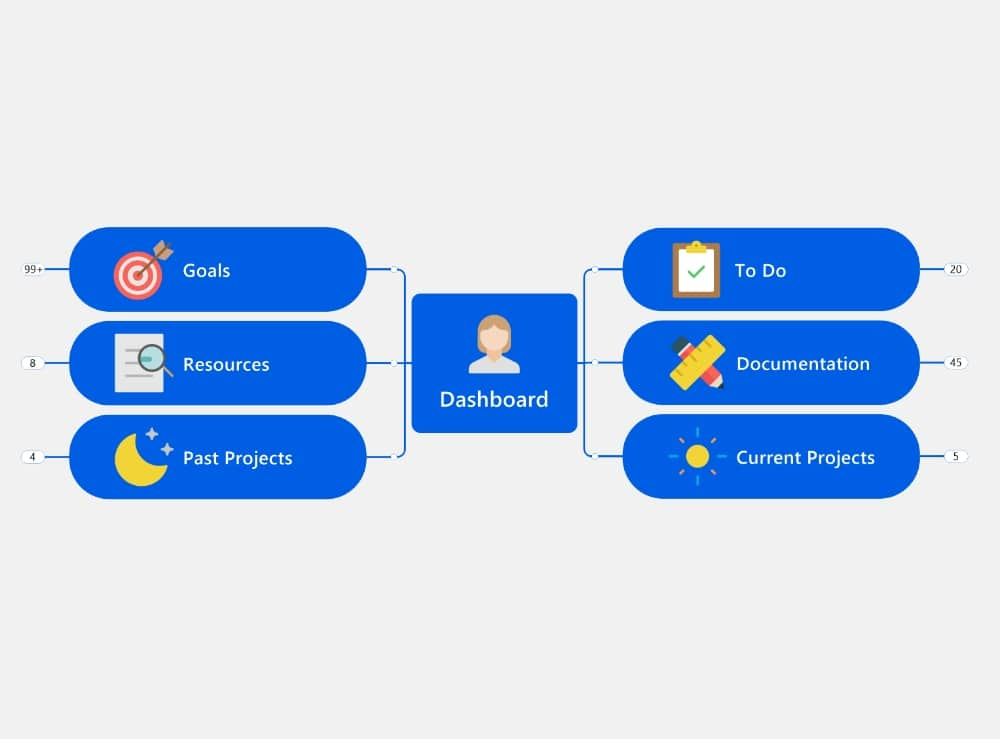
MindManager is a visual productivity and information-mapping software developed by Corel Corporation. It is designed to help individuals, teams, and organizations capture, organize, connect, and communicate information using visual maps, diagrams, charts, and planning tools. Corel acquired MindManager from Mindjet in 2016, and MindManager remains a Corel product today.
At its simplest, MindManager can be used to create traditional mind maps for brainstorming and organizing ideas. However, the software has developed into a much broader platform. Depending on the version and plan, users can create flowcharts, organizational charts, timelines, Kanban boards, Gantt charts, concept maps, process diagrams, and other visualizations.
That makes MindManager different from a basic mind-mapping application. The idea is to take information that may otherwise be scattered across notes, documents, tasks, or conversations and turn it into a visual structure that can be planned, analyzed, and shared.
What Can You Use MindManager For?
MindManager covers several productivity scenarios, including:
- Brainstorming and ideation — Organizing ideas visually and exploring relationships between them.
- Project planning — Breaking projects into tasks, timelines, dependencies, and milestones.
- Process mapping — Creating flowcharts and other diagrams to document workflows.
- Information organization — Structuring large amounts of related information into maps and diagrams.
- Strategic planning — Visualizing goals, strategies, decisions, and relationships.
- Task management — Tracking work and presenting tasks through different visual views.
- Collaboration — Sharing and working with visual information as part of a team workflow.
MindManager also supports integrations with other productivity and business tools. Its current product offering highlights integrations with platforms such as Microsoft Teams, SharePoint, and Jira, although the specific capabilities available depend on the product and plan being used.
Who Is MindManager Designed For?
MindManager isn’t aimed exclusively at one type of user. Its current product range includes options for individuals, small teams, and enterprises, with different levels of functionality available depending on the plan.
For an individual, it can be used to organize personal projects, brainstorm ideas, plan work, or structure information. For businesses and teams, the software can be used for project planning, process documentation, knowledge organization, and collaborative work.
There is also a browser-based MindManager Essentials offering for individual productivity and projects, while the broader MindManager product line provides more extensive capabilities for professional and organizational use.
MindManager in 2026
MindManager’s current supported desktop versions include MindManager Windows 25 and MindManager Mac 25, which were released in September 2025 and remain supported. The company also offers browser-based functionality, with capabilities varying by product.
So, while the name MindManager still strongly suggests traditional mind mapping, that description doesn’t really capture the full product anymore. It is better understood as a visual productivity and planning platform that happens to have mind mapping at its core.
Key Features
MindManager’s biggest selling point is that it combines mind mapping with broader visual planning and productivity tools. Rather than limiting users to one type of diagram, the software provides multiple ways to structure information, plan work, and communicate ideas.
Mind Mapping and Visual Organization
At the heart of MindManager is its mind-mapping system. Users can start with a central idea and build branches containing topics, subtopics, notes, links, attachments, images, icons, and other information.
This is useful when a conventional list or document doesn’t adequately show how different pieces of information relate to each other. For example, someone planning a marketing campaign could place the campaign at the center and branch out into content, social media, advertising, deadlines, responsibilities, and ideas.
MindManager also provides different diagram types and layouts beyond traditional mind maps, giving users more flexibility in how they represent information.
Who benefits: Students, researchers, planners, managers, writers, and anyone who prefers organizing information visually.
Limitation: This flexibility can also make MindManager feel more complicated than a basic mind-mapping application. Users who only want to create simple mind maps may not need all of the additional functionality.
Project Planning and Gantt Charts
MindManager can turn visual maps into more structured project plans. Tasks can include information such as dates, durations, milestones, and dependencies, while Gantt views provide a timeline-based way of looking at the project.
This is one of the features that separates MindManager from a straightforward brainstorming application. A user can start by brainstorming what needs to be done and then develop that information into an actual project structure.
MindManager also supports other project-oriented visualizations, including Kanban boards, timelines, PERT charts, and Critical Path Method (CPM) charts.
Who benefits: Project managers, business users, students working on large projects, and teams that need to visualize schedules and dependencies.
Limitation: MindManager isn’t necessarily a replacement for every dedicated project-management platform. Users with highly specialized project-management requirements may still need software built specifically around those workflows.
Templates and Pre-Built Visual Formats
Starting with a blank canvas isn’t always the easiest way to build a useful map. MindManager provides a library of templates covering areas such as brainstorming, project management, planning, process mapping, decision-making, SWOT analysis, organizational charts, and more.
Templates can reduce the amount of setup required and give less experienced users a starting structure.
For example, someone documenting a business process can begin with a workflow template rather than manually constructing every element of the diagram.
Who benefits: Beginners, business users, students, and anyone who regularly creates similar types of plans or diagrams.
Limitation: A template doesn’t automatically make the underlying planning process better. Users still need to decide what information belongs in the map and how it should be organized.
Multiple Views and Diagram Types
Another major strength is the ability to look at the same information in different visual formats.
Depending on the functionality available in the version being used, MindManager supports formats such as:
- Mind maps
- Flowcharts
- Timelines
- Gantt charts
- Kanban boards
- Concept maps
- Organizational charts
- Matrix diagrams
- Venn diagrams
- Whiteboards
- Process and workflow diagrams
This matters because different types of information are easier to understand in different formats. A project schedule may make more sense as a Gantt chart, while brainstorming is naturally suited to a mind map.
Who benefits: Users who need to move between brainstorming, planning, analysis, and presentation without rebuilding their information in completely different applications.
Collaboration and Co-Editing
MindManager isn’t limited to individual use. Its collaboration features allow users to share maps and work together, including real-time co-editing for supported workflows. The company also provides MindManager Files for cloud-based storage and sharing, as well as integration with Microsoft Teams.
Its web whiteboard functionality also supports collaborative work, including sharing permissions, sticky notes, images, and the ability to turn ideas into tasks with due dates.
For teams, this can make MindManager more useful than a standalone diagramming application because the map can become part of the actual collaboration process rather than simply being an exported image.
Who benefits: Remote teams, project groups, managers, consultants, and organizations that regularly brainstorm or plan together.
Limitation: Collaboration capabilities can vary depending on the product and plan, so users should check exactly which features are included before choosing a subscription.
Integrations
MindManager can connect with other business and productivity software. Its current product offering highlights integrations with Microsoft Teams, SharePoint, and Jira, among others.
These integrations are particularly relevant for organizations that already use Microsoft or Jira-based workflows. Instead of keeping visual planning completely separate from the tools a team already uses, MindManager can fit into parts of an existing workflow.
Who benefits: Businesses and teams already working with supported Microsoft or Jira environments.
Limitation: Integration availability isn’t necessarily identical across all versions and plans, so this is another area where checking the specific plan matters.
Whiteboards and Brainstorming
MindManager also provides web-based whiteboard functionality for brainstorming and collaborative planning. Users can start with a template or blank canvas, add text, sticky notes, images, and other elements, and share the board with other people.
This gives MindManager another use beyond structured mind maps. A team can begin with relatively unstructured ideas and gradually turn those ideas into tasks and plans.
That progression — ideas → structure → tasks → project plan — is arguably one of the more interesting aspects of MindManager’s overall design.
Who benefits: Teams conducting brainstorming sessions, workshops, planning meetings, and collaborative problem-solving.
Export and Sharing Options
MindManager also provides several ways to share the information created inside the software. Depending on the workflow, maps can be exported or shared in formats including PDF, images, Word documents, text/outlines, and HTML5 interactive maps.
This is useful when someone needs to take information created in MindManager and provide it to someone who doesn’t use the software.
Who benefits: Professionals preparing reports, presentations, project documentation, or information for clients and colleagues.
Limitation: Exporting a map into another format doesn’t necessarily reproduce every interactive or editable aspect of the original MindManager project.
Our Take on the Feature Set
MindManager’s feature set is clearly broader than what you’d expect from a conventional mind-mapping application. Mind maps are the foundation, but project planning, multiple diagram types, collaboration, templates, integrations, and different viewing options are what turn it into a broader productivity platform.
The trade-off is complexity. If you only need a quick mind map, MindManager may offer considerably more functionality than you need. But if you regularly move from brainstorming to planning to task management, the wider toolkit becomes much more relevant.
Pros and Cons
MindManager has a broad feature set, but more functionality doesn’t automatically mean it’s the right productivity tool for everyone. Here’s where the software genuinely stands out — and where its limitations become more noticeable.
Pros
- Extensive visual planning capabilities — MindManager supports much more than traditional mind maps, including flowcharts, timelines, Gantt charts, Kanban boards, and other visual formats.
- Strong project-planning functionality — Tasks, dependencies, milestones, timelines, and different project views make it useful for organizing more complex projects.
- Large template selection — Templates provide useful starting points for brainstorming, project planning, process mapping, decision-making, and other workflows.
- Useful collaboration features — Supported plans provide sharing and collaborative capabilities that make MindManager suitable for team-based planning.
- Multiple ways to view the same information — Being able to move between different visual representations can be useful when working with complex information.
- Business-focused integrations — Support for tools such as Microsoft Teams, SharePoint, and Jira makes the software more relevant to established business workflows.
- Good fit for visually oriented users — People who find traditional lists and documents difficult to work with may find visual mapping a more natural way to organize information.
Cons
- Can be more software than some users need — Someone looking only for basic mind mapping may find the broader feature set unnecessary.
- Learning curve increases with the feature set — There is more to learn than with a simple mind-mapping application, particularly when moving into project planning and advanced visualizations.
- Some functionality depends on the plan — Features, collaboration capabilities, and platform access vary across MindManager’s different offerings, so users need to compare plans carefully before purchasing.
- Potentially expensive for casual users — The broader productivity toolkit makes more sense for users who will regularly use those capabilities rather than someone who occasionally creates a mind map.
- Not a universal replacement for specialist tools — MindManager can cover several productivity workflows, but users with highly specialized project-management, diagramming, or collaboration requirements may still need dedicated software.
The Bottom Line on the Pros and Cons
The biggest advantage of MindManager is also potentially its biggest drawback: scope.
It gives users considerably more than a basic mind-mapping program, but that additional functionality only becomes valuable if you actually use it. For a project manager, business professional, or team that needs to move between brainstorming, information organization, task planning, and visual project management, the breadth can be useful.
For someone who simply wants to create an occasional mind map, paying for a larger productivity platform may be harder to justify.
Performance & User Experience
MindManager’s user experience is closely tied to what makes the software different from a basic note-taking or mind-mapping application: there is a lot of functionality available in one environment. That can be useful for users managing complex projects, but it also means there is more to learn.
Interface and Navigation
MindManager is built around a visual workspace where users can create and manipulate maps, diagrams, tasks, and other information. The interface is designed to give users access to a wide range of formatting, mapping, and planning tools without requiring separate applications.
For users already familiar with mind-mapping software, the basic concept should be relatively easy to understand. The challenge comes when moving beyond basic maps into features such as Gantt charts, project planning, advanced diagramming, collaboration, and integrations.
In other words, MindManager has a learning curve, but that curve is largely a consequence of its breadth rather than an inherently complicated core concept.
Setup and System Requirements
The current Windows release, MindManager Windows 25, supports Windows 10 and Windows 11 and officially requires at least a 1.6 GHz dual-core processor, 4 GB of RAM, and 1.5 GB of available storage. Some features also require an internet connection and additional Microsoft software such as Office or Project.
MindManager Mac 25 supports macOS 14 Sonoma through macOS Tahoe 26, while MindManager Web can be accessed through current versions of Chrome, Firefox, Edge, and Safari on supported computers.
These requirements aren’t particularly demanding by modern desktop-software standards. However, meeting the minimum requirements doesn’t necessarily mean every large or complex map will behave identically across different computers.
Performance
What we can establish is that the current Windows version has relatively modest published hardware requirements, while the software is designed to handle everything from simple mind maps through more complex project-planning and visualization workflows.
For normal users, the more important performance consideration may therefore be how complex their projects become and what hardware they are running the software on, rather than a simple “fast versus slow” comparison.
Ease of Use
MindManager’s basic concept is straightforward: start with information and organize it visually.
The difficulty increases as users explore the software’s broader capabilities. Someone creating a simple brainstorming map doesn’t need to understand Gantt charts, dependencies, Kanban views, integrations, or collaborative workflows. Someone using MindManager as a full project-planning platform potentially does.
The extensive templates help reduce some of that initial friction by giving users predefined structures rather than requiring them to build everything from scratch.
Reliability and Support
MindManager continues to maintain current desktop releases, with Windows 25 and Mac 25 listed as current versions. The company also provides online help, a knowledge base, community resources, and technical/customer support.
MindManager’s lifecycle policy also shows why keeping the software updated matters: older versions eventually reach retirement, after which live technical support is discontinued.
Overall User Experience
The overall experience is best suited to people who think and work visually.
If your workflow involves brainstorming an idea, breaking it into components, turning those components into tasks, assigning dates, and eventually presenting or sharing the resulting information, MindManager provides a lot of that functionality in one product.
The trade-off is that casual users may find the software unnecessarily comprehensive. A person who only wants a simple mind map doesn’t necessarily benefit from having an entire project-planning toolkit available.
Pricing
MindManager uses a multi-tier pricing model, rather than a single version for everyone. The current lineup includes options for individual productivity, professional users and small teams, and larger organizations. Because MindManager’s prices can change, VisionTechHQ does not list a fixed price in this review. Readers should check the official pricing page for the current cost before purchasing.
MindManager Essentials
Essentials is the web-based option aimed at individual projects and personal productivity. It provides access to core visual planning capabilities through a browser and is positioned as a simpler option for individual users.
This could make sense for someone who primarily wants MindManager for personal planning without needing the full desktop application and broader professional feature set.
MindManager Professional
Professional is positioned as the more complete option for individuals and small teams. It includes the broader MindManager feature set, collaboration capabilities, and access to the latest versions. The plan also provides access across supported desktop and other platforms, depending on the feature.
For users who expect to make regular use of MindManager for project planning, visual organization, and collaboration, this is the plan that’s more representative of the full MindManager experience.
One-Time Purchase
MindManager also offers a one-time purchase option for users who prefer not to subscribe.
The major trade-off is important: the license applies to the version purchased and does not include free upgrades to future major versions. The one-time license also has platform-specific limitations — for example, a Windows license does not activate the Mac version.
This can be attractive to users who prefer paying once, but anyone choosing this route should understand that future major-version upgrades may require another purchase.
Enterprise
MindManager Enterprise is designed for larger organizations, teams, governments, nonprofits, and educational institutions. It adds enterprise-oriented capabilities such as IT administration, deployment options, volume licensing, SSO-related functionality, dedicated support, and optional training and consulting services.
Enterprise pricing is handled through custom quotes, rather than a standard public price.
Free Trial
MindManager provides a 30-day fully functional free trial, and the company states that a credit card isn’t required to start it. This gives prospective users an opportunity to evaluate the full software before committing to a paid plan.
That’s particularly useful with MindManager because its value depends heavily on whether its broader feature set actually fits your workflow.
Is MindManager Good Value?
The answer depends largely on how much of MindManager you intend to use.
If you only need occasional mind maps, paying for a full productivity platform may be difficult to justify. However, someone using MindManager for regular project planning, task organization, visual analysis, collaboration, and information management can potentially get considerably more value from the software.
The availability of both subscription and one-time-purchase options is also useful because users can choose between staying current with the software or paying once for a particular version. The trade-off is that the one-time option doesn’t provide the same ongoing upgrade access as the annual Professional plan.
For the latest plans and current pricing, check MindManager’s official pricing page
Who Should Use MindManager?
MindManager’s broad feature set means it isn’t equally useful for everyone. The software makes the most sense for people who regularly need to organize complex information, plan projects, visualize relationships, or collaborate around ideas.
Professionals and Business Users
MindManager can be useful for professionals who regularly deal with complex projects, planning sessions, processes, and large amounts of information.
Its combination of mind maps, diagrams, task management, timelines, and project-planning views means users can move from an initial idea to a more structured plan without necessarily switching applications.
Best suited for: Project managers, consultants, managers, business analysts, strategists, and other knowledge workers.
Project Managers
Project managers are one of the clearest audiences for MindManager.
The ability to organize tasks visually and use features such as Gantt charts, dependencies, milestones, timelines, and Kanban-style views can help turn an initial project concept into something more structured.
However, MindManager shouldn’t automatically be treated as a replacement for every dedicated project-management platform. Teams with highly specialized project-management requirements may still need a more focused solution.
Students and Researchers
Students can use MindManager to brainstorm ideas, structure assignments, organize research topics, plan projects, and turn complicated subjects into visual maps.
The visual approach can be particularly useful when a student needs to see how concepts relate to one another rather than keeping everything in a linear list of notes.
That said, students who only need basic note-taking or occasional brainstorming may find MindManager’s broader functionality unnecessary.
Teams and Collaborative Workgroups
MindManager’s collaboration and sharing capabilities make it relevant to teams that regularly brainstorm, plan, or organize information together.
Its support for collaborative workflows and integrations with business tools can make it more useful in an organization where multiple people need to contribute to the same planning process.
Best suited for: Remote teams, project groups, managers, consultants, and organizations that use visual planning as part of their workflow.
Visually Oriented Thinkers
This is perhaps the simplest way to describe MindManager’s core audience.
If you naturally prefer maps, diagrams, branches, timelines, and visual relationships over long documents and conventional task lists, MindManager provides a lot of tools built around that style of working.
It can also be useful when the information itself is complicated enough that a conventional list doesn’t adequately show the relationships between different pieces.
Who May Want an Alternative?
MindManager may not be the right choice if:
- You only need basic mind mapping.
- You primarily want a simple to-do list or task manager.
- You rarely create visual plans or diagrams.
- You don’t expect to use its broader project-planning features.
- You need highly specialized functionality that is better served by a dedicated project-management or diagramming platform.
- You’re looking for the simplest possible productivity application with very little setup or learning required.
The important point is that MindManager’s feature depth is valuable only when you actually use it. Paying for a comprehensive visual-planning platform doesn’t make much sense if your needs can be handled comfortably by a simpler tool.
Final VisionTech Verdict
MindManager is a productivity platform that has grown considerably beyond traditional mind mapping. Its combination of mind maps, project planning, Gantt charts, Kanban boards, timelines, flowcharts, templates, collaboration features, and integrations gives it a much broader purpose than simply organizing ideas visually.
That breadth is also the main consideration for potential users.
What MindManager Does Well
The biggest strength is flexibility. You can start with a relatively simple brainstorming session and build that information into a more structured project plan without necessarily moving to an entirely different application.
Its visual approach can also make complicated information easier to organize. Instead of forcing everything into conventional lists or documents, users can represent relationships between ideas, tasks, processes, and other information visually.
The collaboration and integration capabilities make MindManager more relevant to professional teams as well, particularly organizations already using supported business platforms.
Where MindManager Falls Short
The biggest limitation is that not everyone needs this much functionality.
If your only requirement is creating an occasional mind map, MindManager’s broader feature set may be unnecessary. There is also more to learn compared with a lightweight mind-mapping application.
Cost is another consideration. While MindManager offers different purchasing options and a trial, its value depends heavily on whether you will actually use the additional productivity and planning capabilities.
The software also isn’t designed to replace every specialist application. Someone who needs highly advanced project management, task automation, or another specialized workflow may still be better served by a dedicated platform.
Is MindManager Worth Using in 2026?
Yes, for the right type of user.
MindManager makes the most sense when you need more than a basic mind-mapping tool. If your work involves brainstorming, project planning, visual information management, process mapping, task organization, or collaborative planning, its broad feature set gives you a lot to work with.
For someone who simply wants to create straightforward mind maps, however, the additional functionality and associated cost may be difficult to justify.
The 30-day fully functional trial is therefore particularly useful. Rather than relying solely on feature lists, prospective users can try the software and determine whether its workflow actually fits the way they work.
Who Should Use MindManager?
MindManager is worth considering if you’re:
- A project manager who needs visual project-planning tools.
- A professional who regularly organizes complex information.
- A student working on large assignments or research projects.
- A team that frequently brainstorms and plans collaboratively.
- A visually oriented user who prefers maps and diagrams over conventional lists.
- Someone looking for a broader productivity platform rather than a basic mind-mapping application.
Who Should Probably Look Elsewhere?
You may want to consider alternatives if you:
- Only need simple mind mapping.
- Want a very lightweight productivity application.
- Don’t need project-planning or collaboration features.
- Prefer a dedicated task-management or project-management platform.
- Won’t make regular use of MindManager’s broader feature set.
Our Overall Recommendation
MindManager earns its place as a serious productivity tool because it combines visual thinking with practical planning capabilities. Its strongest users are unlikely to be people who simply want to draw mind maps; they’re people who can take advantage of the software’s ability to move from ideas and information into structured plans and projects.
At the same time, we wouldn’t recommend buying it simply because it has a long feature list. The value comes from using those features.
For professionals, project planners, teams, and other users with complex visual-organization needs, MindManager is a capable option worth investigating. For casual users, a simpler and potentially less expensive tool may make more sense.
VisionTechHQ Overall Rating: 4/5 ★★★★☆
If MindManager looks like the right fit for your workflow, you can explore the available plans and features through the official MindManager website before deciding whether to purchase.
Frequently Asked Questions About MindManager
Is MindManager worth using in 2026?
MindManager can be worth using in 2026 if you need more than basic mind mapping. Its combination of mind maps, project planning, Gantt charts, Kanban boards, timelines, flowcharts, templates, and collaboration tools makes it useful for complex planning and information organization. However, casual users may find it more extensive and potentially more expensive than necessary.
Is MindManager good for project management?
Yes. MindManager includes project-planning features such as tasks, dependencies, timelines, Gantt charts, Kanban boards, and other visual planning tools. It can be useful for organizing and visualizing projects, although teams with highly specialized project-management requirements may still prefer dedicated project-management software.
Can MindManager create Gantt charts?
Yes. MindManager supports Gantt charts as part of its project-planning capabilities. You can use them to visualize tasks, schedules, milestones, and dependencies.
Does MindManager have a free version?
MindManager offers a free trial that allows users to evaluate the software before purchasing. Its available plans and features vary, so users should check the official MindManager website for the latest options and licensing details.
Can MindManager be used for collaboration?
Yes. MindManager provides collaboration features that allow users to share and work on visual information together. Some collaboration capabilities, integrations, and sharing options depend on the version or plan being used.
Does MindManager work on Mac and Windows?
Yes. MindManager has versions for both Windows and Mac, as well as web-based functionality. Specific features and system requirements can vary between platforms and product versions.
Is MindManager difficult to learn?
The basic mind-mapping functionality is relatively straightforward, but MindManager’s broader feature set can take more time to learn. Users who want to take advantage of project planning, different diagram types, collaboration, and integrations should expect some learning time.
Who is MindManager best suited for?
MindManager is particularly suited to professionals, project managers, teams, students, researchers, and other users who need to organize complex information visually. It is less compelling for someone who only wants a simple mind-mapping application.
Can MindManager replace project-management software?
It can handle many project-planning tasks, but it should not automatically be considered a replacement for every dedicated project-management platform. Whether it is sufficient depends on the complexity of the workflow, collaboration requirements, integrations, and reporting features a team needs.
Does MindManager offer a one-time purchase?
Yes. MindManager has offered one-time purchase licensing for specific versions alongside subscription-based options. A one-time license generally applies to a particular major version rather than providing automatic access to future major releases.
Leave a Reply