Managing references can become surprisingly difficult once a research project involves dozens or hundreds of academic papers. Keeping track of sources, formatting citations, organizing PDFs, and maintaining a consistent bibliography can take a significant amount of time when done manually.
EndNote is designed to handle that work in one place. Developed by Clarivate, it is a reference and citation management tool aimed primarily at researchers, students, academics, and other users who regularly work with scholarly sources. The current desktop version is EndNote 2025, which remains the latest release in 2026.
The latest version adds features such as AI-assisted research tools, PDF summarization and translation, reference updates, citation tools, and an updated EndNote Web experience. But EndNote is also a paid product, so the question is whether its features justify using it over simpler or free reference-management alternatives.
In this review, we’ll look at EndNote’s features, usability, performance, pricing, strengths, weaknesses, and who it makes the most sense for.
Quick VisionTechHQ Verdict
| Category | Rating |
|---|---|
| Reliability | ★★★★☆ |
| Performance | ★★★★☆ |
| Ease of Use | ★★★★☆ |
| Features | ★★★★★ |
| Value for Money | ★★★★☆ |
| Overall Rating | ★★★★☆ |
Best For: Students, researchers, academics, and professionals who regularly manage large collections of academic references.
Bottom Line: EndNote is a feature-rich reference management tool that goes well beyond basic citation generation, but its extensive feature set and paid licensing make it more suited to serious research workflows than casual users.
What Is EndNote?
EndNote is reference management software developed by Clarivate. It is designed to help researchers, students, academics, and other users collect, organize, manage, and cite sources used in academic and professional writing.
Instead of manually keeping track of article titles, authors, publication details, journal information, and citation formatting, EndNote stores this information in a searchable reference library. Users can import references from academic databases and websites, organize them into groups, attach PDFs, and insert citations into documents.
One of EndNote’s main purposes is to make the writing process easier when a document contains a large number of sources. Its word-processing integration allows users to insert references while writing and generate a bibliography based on the citations used in the document.
EndNote also includes tools beyond basic citation management. Depending on the version and platform, these include PDF management, reference updating, collaboration features, online synchronization, journal-related tools, and AI-assisted research features.
Who Develops EndNote?
EndNote is developed and published by Clarivate, a company that provides research and analytics tools to academic institutions, researchers, publishers, and other organizations.
EndNote is part of Clarivate’s broader research ecosystem, which also includes products and services used for scholarly publishing, research discovery, citation analysis, and academic information management.
What Problem Does EndNote Solve?
The main problem EndNote addresses is the difficulty of managing references as a research project grows.
For a short paper with a handful of sources, manually managing references may be manageable. For a dissertation, thesis, journal article, or large research project containing dozens or hundreds of sources, keeping everything organized becomes considerably more complicated.
EndNote can help by allowing users to:
- Store references in a central library.
- Organize sources into groups.
- Import reference information from supported databases and websites.
- Attach and manage PDF files.
- Insert citations while writing.
- Automatically generate and update bibliographies.
- Change citation styles without manually reformatting every reference.
- Search and manage a large collection of references from one application.
This makes EndNote particularly relevant to people who regularly work with academic literature and lengthy research documents, rather than someone who only needs to create an occasional citation.
EndNote Desktop vs. EndNote Web
EndNote has both a desktop application and an online component known as EndNote Web. The desktop application provides the more comprehensive reference-management environment, while EndNote Web provides browser-based access and synchronization capabilities.
That distinction matters because EndNote isn’t simply a citation generator. Its desktop software is intended to function as a more complete research-management system, while the online component can make a user’s reference library accessible across supported devices and workflows.
For someone who only needs occasional citations, that broader approach may be more than necessary. For researchers managing a substantial reference library, however, having those tools in one ecosystem can be useful.
Key Features
EndNote’s biggest strength is the breadth of tools it puts around reference management. It isn’t limited to generating citations; it also provides ways to organize research, manage PDFs, discover related literature, and work with references while writing. EndNote 2025 adds several newer AI-assisted features as well.
Reference Library Management
At its core, EndNote provides a central library for storing and organizing references. Users can import references from hundreds of databases, organize them into groups, use customized tags, and automatically identify duplicate references. EndNote also supports Smart Groups for automatically organizing references according to defined criteria.
This is particularly useful for larger research projects where keeping track of sources manually can become difficult. Someone working on a dissertation or literature review, for example, can separate references according to chapters, research topics, or other categories.
Cite While You Write
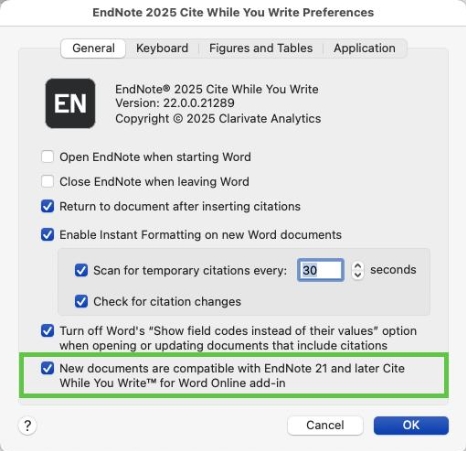
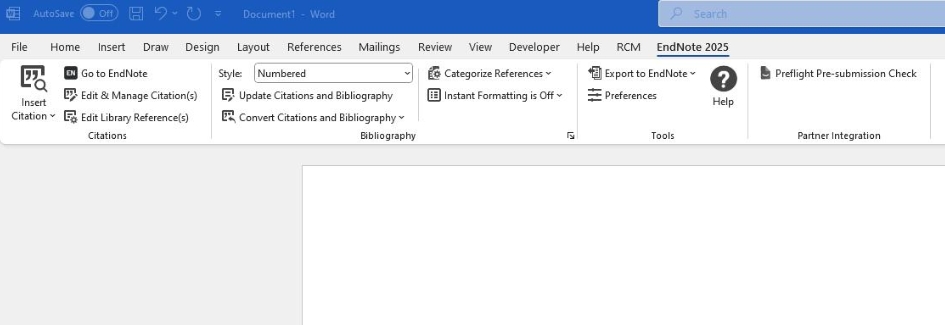
One of EndNote’s most important features is Cite While You Write, which integrates with supported word-processing workflows.
Rather than switching back and forth between a document and a reference list, users can insert citations from their EndNote library while writing. EndNote can then generate and format the bibliography based on the citations included in the document.
EndNote 2025 also supports Cite While You Write with Google Docs and Word Online, in addition to its established Word integration.
For anyone regularly writing academic papers, this can eliminate a substantial amount of repetitive citation formatting.
Large Selection of Citation Styles
Citation requirements can vary considerably between universities, journals, and academic disciplines. EndNote provides access to 7,500+ bibliographic styles, covering formats used across different fields.
This gives users considerable flexibility when a project requires a particular citation style. It also means that changing the formatting of an existing document doesn’t necessarily require manually editing every reference.
PDF Management
EndNote can store PDF files alongside their corresponding references, allowing users to keep research papers and their bibliographic information together.
The software also includes tools for finding available full-text articles and updating reference information. EndNote 2025 adds Cite from PDF, which allows users to insert a highlighted quotation from a PDF together with its corresponding citation.
This is especially useful for researchers who work heavily with downloaded academic papers and want their reference library to remain connected to the documents they’re reading.
AI-Powered EndNote Research Assistant
One of the major additions in EndNote 2025 is the EndNote Research Assistant.
It can interact with documents in the user’s library and provide functions such as asking questions about a document, generating key takeaways, summarizing selected sections, and translating PDFs or selected text.
These tools can potentially reduce the amount of time spent extracting basic information from papers, but they should still be treated as research aids rather than replacements for actually reading and evaluating academic sources.
Find a Journal
EndNote 2025 includes an enhanced Find a Journal tool that uses machine learning to help identify journals that may be relevant to a manuscript. It is available through the Cite While You Write plugin.
This could be useful when a researcher has completed a paper but isn’t sure which publication might be appropriate for submission.
Research Discovery Tools
EndNote 2025 also adds integration with Web of Science for discovering related records and articles that have cited references already in a user’s library. This can help researchers expand a literature search beyond the papers they have already collected.
However, access to some Web of Science functionality depends on having the appropriate Web of Science subscription or access.
Reference Updates and Retraction Checking
Keeping reference information accurate becomes increasingly important as a research library grows. EndNote includes tools for updating reference details and finding available full-text versions.
It also provides retraction tools that can flag retracted articles in a user’s library and when using Cite While You Write.
That’s a useful feature for researchers because a paper that was originally considered suitable for citation may later be retracted.
Collaboration and Cloud Synchronization
EndNote supports sharing libraries with other users and synchronizing research through EndNote Web. EndNote’s current comparison information states that EndNote 2025 supports library sharing with up to 1,000 users, while the newer EndNote Web provides unlimited file-attachment storage.
This makes the software more suitable for collaborative research than a reference manager intended solely for individual use.
Overall, EndNote’s feature set is considerably broader than basic citation generation. Its strongest appeal is to people who need a complete research workflow covering reference organization, PDF management, citation formatting, discovery, and academic writing. The trade-off is that the sheer number of tools can make EndNote feel more involved than simpler reference managers.
Pros and Cons
EndNote’s feature set gives it some clear advantages for serious academic research, but its breadth also creates trade-offs. Here’s where the software stands out and where potential users should be more cautious.
Pros
- Extensive reference-management tools — EndNote can handle much more than basic citation generation, including reference organization, PDF management, duplicate detection, and library searching.
- Large selection of citation styles — With more than 7,500 bibliographic styles available, EndNote can accommodate a wide range of academic formatting requirements.
- Strong writing integration — Cite While You Write makes inserting references and generating bibliographies considerably easier when working on long documents.
- Useful PDF tools — Keeping PDFs alongside their references can make a large research library easier to manage.
- AI-assisted research features — EndNote 2025 adds tools such as document summaries, questions about documents, key takeaways, and translation.
- Good collaboration support — Libraries can be shared with other EndNote users, making the software suitable for collaborative research projects.
- Retraction checking — The ability to identify retracted references can be useful when maintaining a research library.
Cons
- More complicated than basic citation tools — EndNote’s large feature set can be unnecessary for someone who only needs to generate occasional citations.
- Paid software — Unlike some reference managers that offer a completely free core experience, EndNote is primarily a commercial product, so cost is an important consideration.
- Some features depend on external access — Certain discovery functionality, including Web of Science-related features, can depend on the user’s institutional or subscription access.
- Learning curve — Users who are new to reference-management software may need some time to understand EndNote’s library organization, citation tools, synchronization, and writing integrations.
- Potentially more software than casual users need — Students working on a short assignment or users managing only a small number of references may find simpler tools sufficient.
The Bottom Line
The main advantage of EndNote is depth rather than simplicity. It is built for people who expect their reference library and research workflow to become substantial. That makes its extensive feature set valuable for serious researchers, but it also means casual users may not get enough benefit to justify learning and paying for the software.
Performance & User Experience
EndNote is a fairly feature-heavy application, so the user experience depends heavily on how much of its functionality you actually need. It is designed around managing substantial research libraries rather than providing a minimal citation tool.
Overall Performance
EndNote’s current desktop requirements are relatively modest. On Windows, Clarivate lists a minimum of 2 GB of available RAM and 600 MB of disk space, while the Mac version requires 2 GB of available RAM and 700 MB of storage. It supports Windows 10 and 11 as well as a range of supported macOS versions.
That means the basic application does not require particularly powerful hardware on paper. However, system requirements alone don’t tell us how quickly EndNote will perform with a very large library or a collection containing many PDFs, so we wouldn’t claim specific speeds or benchmark results without hands-on testing.
Interface and Navigation
EndNote provides a desktop-based research library where users can search, organize, group, and manage their references. The software also includes a redesigned EndNote Web experience intended to provide a more modern browser-based way of accessing and synchronizing research.
The trade-off is that EndNote exposes users to considerably more functionality than a simple citation generator. New users may need some time to understand how libraries, groups, tags, synchronization, citation styles, and word-processing integrations fit together.
For someone managing hundreds or thousands of references, that depth can be useful. For someone who only needs a handful of citations for an occasional assignment, it may feel unnecessarily complicated.
Setup and Learning Curve
Getting started involves installing the desktop application and setting up an EndNote library. Users who want to synchronize their library across computers or use EndNote Web will also need to configure their online account and synchronization.
EndNote supports cross-platform libraries, and an individual license can be installed on up to three computers for personal use, including combinations of Windows and Mac systems.
The software’s extensive capabilities mean there is a learning curve, particularly for users who have never used reference-management software before. This isn’t necessarily a flaw, but it is something to consider before choosing EndNote over a simpler alternative.
Reliability and Updates
Clarivate continues to maintain EndNote 2025. The latest listed Windows update, EndNote 2025.3.1, was released on January 30, 2026, and included bug fixes as well as a fix for an issue that could cause Word to crash when using Select Matching References. The corresponding macOS 2025.3 update was released on January 27, 2026.
That ongoing maintenance is encouraging for users who depend on the application for long-term research projects.
Word-Processing Integration
One of EndNote’s strongest usability advantages is its integration with writing workflows. Its Cite While You Write tools allow references to be inserted while working on documents, while EndNote can handle bibliography formatting based on the selected citation style. The current version also supports Cite While You Write with Google Docs and Word Online.
For a long academic document, this can be much more practical than manually maintaining a bibliography.
Our Take on the User Experience
EndNote isn’t designed to win users over through simplicity alone. Its appeal comes from having a large number of research-management tools available in one environment.
For serious researchers, that depth can make the learning curve worthwhile. For casual users, the opposite may be true: if you only need basic citation management, much of EndNote’s functionality may go unused.
Overall, the user experience is best described as powerful but more involved than a basic reference manager. The software appears well maintained, supports modern Windows and Mac systems, and provides a comprehensive research workflow, but users should expect to spend some time learning the platform.
Pricing
EndNote uses a one-time purchase model for its individual licenses, rather than requiring users to pay a recurring monthly or annual subscription for the desktop software. The current EndNote 2025 purchase options include a full license for new users, an upgrade license for existing EndNote users, and a discounted student license.
Free Trial
If you’re unsure whether EndNote is right for you, Clarivate offers a 30-day free trial of EndNote 2025. The trial allows prospective users to try the software before committing to a purchase. According to EndNote’s current trial terms, users who don’t want to continue can opt out during the trial period.
There’s also a free EndNote iPad/iOS app, although that shouldn’t be confused with the full desktop version.
Full License
The full license is intended for people purchasing EndNote for the first time. It provides access to the complete EndNote 2025 desktop and cloud-based experience.
The important thing here is that this is a one-time purchase, rather than a traditional subscription. That can make EndNote more appealing to researchers who expect to use reference-management software for several years.
Check EndNote’s current pricing and licensing options
Upgrade License
Existing users who own EndNote 21 or an earlier version can purchase an upgrade license rather than buying the full license again. This gives eligible users access to EndNote 2025 and its newer features.
Student License
Students can receive a discounted EndNote license after verifying their eligibility. Current eligibility requirements include proof of enrollment at an eligible educational institution.
This makes EndNote considerably more accessible for students working on substantial academic projects such as dissertations, theses, and research papers.
Multi-User and Institutional Licensing
Organizations, universities, research groups, businesses, and government organizations can also purchase multi-user or site licenses. Pricing for these arrangements is handled separately rather than being listed as a standard individual purchase.
This makes sense for institutions that need to provide EndNote to multiple researchers rather than purchasing individual licenses separately.
Is EndNote Good Value?
The value proposition depends heavily on how you intend to use it.
For someone who occasionally needs to create a few citations, paying for a full reference-management platform may be difficult to justify, especially when free alternatives exist.
For researchers managing hundreds of sources, PDFs, citation styles, and long academic documents, the calculation is different. EndNote’s one-time licensing, extensive citation-style support, synchronization, collaboration tools, and research features can make the cost easier to justify.
The 30-day trial is particularly useful here, because users can determine whether EndNote actually fits their workflow before purchasing it.
Pricing note: We intentionally haven’t listed specific dollar amounts because EndNote’s pricing and promotional discounts can change. Readers should check the official pricing page for the current price in their region before purchasing.
VisionTechHQ take: EndNote isn’t the cheapest way to manage references, but its one-time licensing model is more straightforward than a recurring subscription. For serious researchers who will regularly use its deeper features, the pricing can make sense; for casual citation needs, a free reference manager may provide enough functionality without the additional cost.
Who Should Use EndNote?
EndNote is not really aimed at someone who needs to create a citation once in a while. Its broader feature set makes more sense when reference management is a regular part of your work.
Students
EndNote can be particularly useful for students working on research-heavy assignments, dissertations, theses, and postgraduate projects.
If you’re dealing with a large number of academic sources, being able to organize references, attach PDFs, insert citations while writing, and automatically maintain a bibliography can save considerable manual work.
However, students writing relatively short assignments with only a small number of sources may find a simpler reference manager sufficient.
Researchers and Academics
This is arguably EndNote’s natural audience.
Researchers who regularly collect academic papers and maintain large reference libraries can benefit from features such as:
- Reference organization and searching
- Duplicate detection
- PDF management
- Multiple citation styles
- Citation and bibliography automation
- Reference sharing
- Synchronization
- Research discovery tools
- Retraction checking
The more extensive the research workflow becomes, the more useful EndNote’s broader feature set is likely to be.
University and Research Teams
EndNote can also make sense for research groups and academic institutions that need to share reference libraries and maintain consistent citation workflows across multiple researchers.
Its collaboration and institutional licensing options make it suitable for environments where reference management is a shared requirement rather than an individual task.
Professionals Who Regularly Produce Research
EndNote isn’t exclusively for universities. Professionals who frequently produce research-based reports, publications, or other documents containing substantial numbers of references may also benefit from it.
This could include people working in fields where maintaining accurate bibliographic information is an important part of their workflow.
Who May Not Need EndNote?
EndNote may be excessive for casual users.
If you only need to cite a handful of sources for an occasional school or work document, paying for and learning a full reference-management platform may not provide much benefit.
Similarly, users who primarily want a simple way to generate citations may be better served by a simpler or free reference manager.
Our Take
EndNote makes the most sense when reference management is a recurring part of your work rather than an occasional task.
Its extensive feature set is valuable for people managing substantial research libraries, but that same depth can be unnecessary for users with relatively simple citation requirements. The key question isn’t whether EndNote has enough features, it clearly does, but whether you’ll actually use enough of them to justify choosing a more comprehensive tool.
Final VisionTechHQ Verdict
Is EndNote Worth Using in 2026?
EndNote is a mature and feature-rich reference management platform that makes the most sense for people who regularly work with academic research.
Its biggest strength is the amount of research management functionality it brings together. Reference organization, PDF management, citation formatting, word-processing integration, synchronization, collaboration, and newer AI-assisted research tools give EndNote considerably more depth than a basic citation generator.
The downside is that depth comes with complexity. Someone who only needs to generate citations occasionally may find EndNote more involved than necessary. There is also the cost to consider, particularly when free reference-management alternatives are available.
The one-time licensing model does help EndNote’s value proposition for users who expect to keep using it for several years. The 30-day trial also gives prospective users an opportunity to determine whether its workflow fits their needs before purchasing.
Who Should Use EndNote?
EndNote is best suited to:
- Researchers managing large reference libraries
- Postgraduate students working on dissertations or theses
- Academics regularly publishing research
- Research teams that need shared reference libraries
- Professionals who frequently produce heavily referenced documents
Who Should Consider an Alternative?
EndNote may not be the right fit if you:
- Only need occasional citations
- Have a relatively small reference library
- Don’t need advanced research-management features
- Prefer a completely free reference manager
- Want the simplest possible citation workflow
In those situations, a simpler alternative may provide everything you actually need without requiring you to learn EndNote’s broader feature set.
Final Verdict
EndNote is a strong choice for serious reference management, but it’s not necessarily the right tool for everyone.
Its extensive feature set, broad citation-style support, PDF management, writing integrations, collaboration capabilities, and newer research-assistance tools make it particularly useful for people whose academic or professional work involves managing large numbers of sources.
However, its cost and learning curve make it harder to justify for casual users. If you’re writing a dissertation, conducting substantial research, or regularly working with large reference libraries, EndNote is a tool worth considering. If you simply need citations for occasional assignments, you can probably accomplish that with a simpler solution.
For prospective users, the 30-day trial is the sensible place to start. It gives you an opportunity to test EndNote against your actual workflow before committing to a license.
If EndNote’s feature set matches what you need, you can learn more about the current versions and licensing options through the official EndNote website.
Frequently Asked Questions
Is EndNote safe to use?
EndNote is established reference-management software developed by Clarivate and is widely used in academic and research environments. It is designed to manage references and research documents rather than function as a security or privacy tool, so users should still follow normal precautions when handling sensitive research files.
Is EndNote free?
The full desktop version of EndNote is not free. Clarivate offers a 30-day free trial, while students can qualify for a discounted license. There is also a free EndNote iOS/iPad app, but it does not provide the same experience as the full desktop application.
Does EndNote work with Windows 11?
Yes. EndNote 2025 supports Windows 10 and Windows 11, subject to the version’s current system requirements.
Does EndNote work with Microsoft Word?
Yes. EndNote’s Cite While You Write tools integrate with Microsoft Word, allowing users to insert references and generate bibliographies while working on a document.
Can EndNote work with Google Docs?
Yes. EndNote 2025 supports Cite While You Write with Google Docs, allowing users to insert and manage EndNote references while working in Google’s online word processor.
Can EndNote store PDFs?
Yes. EndNote can store PDF files alongside references in a library, helping users keep research papers and their associated bibliographic information together.
Does EndNote have AI features?
Yes. EndNote 2025 includes the EndNote Research Assistant, which provides AI-assisted features such as asking questions about documents, generating key takeaways, summarizing content, and translating PDFs or selected text.
These features can assist with research, but they shouldn’t replace the user’s own evaluation of academic sources.
Can EndNote detect duplicate references?
Yes. EndNote includes duplicate-reference detection, which can help clean up a library when the same source has been imported more than once.
Can I use EndNote on multiple computers?
Yes. EndNote’s current licensing information allows an individual license to be installed on up to three computers for personal use, including supported Windows and Mac systems.
Is EndNote worth it for students?
It depends on how much reference management you need. Students working on theses, dissertations, major research projects, or assignments with large bibliographies can benefit substantially from EndNote’s broader tools.
For occasional assignments with only a few sources, a simpler or free reference manager may be sufficient.
Is EndNote better than a free reference manager?
There isn’t one answer that applies to everyone. EndNote provides a particularly broad set of reference-management, PDF, citation, collaboration, and research tools, but free alternatives can be sufficient for users with simpler requirements.
The more important question is whether EndNote’s additional functionality is useful for your particular research workflow.
Leave a Reply