

McAfee has been one of the biggest names in antivirus software for decades, protecting millions of users against malware, ransomware, phishing attacks, and other online threats. But with strong competitors like Malwarebytes, Bitdefender, Norton, and Microsoft Defender, many people wonder whether McAfee is still worth paying for in 2026.
In this review, we’ll take an in-depth look at McAfee’s security features, performance, ease of use, pricing, and overall value. We’ll also compare its strengths and weaknesses to help you decide whether it’s the right antivirus solution for your Windows PC.
Whether you’re looking for basic antivirus protection or a complete security suite, this review will help you determine if McAfee deserves a place on your computer.
VisionTech HQ Quick Verdict
| Category | Rating |
| Protection | ⭐⭐⭐⭐⭐ (5/5) |
| Performance | ⭐⭐⭐⭐☆ (4/5) |
| Ease of Use | ⭐⭐⭐⭐⭐ (5/5) |
| Features | ⭐⭐⭐⭐☆ (4.5/5) |
| Value for Money | ⭐⭐⭐⭐☆ (4/5) |
| Overall Rating | ⭐ 4.5/5 |
McAfee remains one of the most reliable antivirus solutions available in 2026. It delivers excellent malware protection, a polished user experience, and a comprehensive suite of security tools, including real-time protection, ransomware defense, a firewall, VPN (on eligible plans), identity monitoring, and web protection.
That said, it isn’t the perfect choice for everyone. Some plans are more expensive than competing products, and several premium features are locked behind higher-priced subscriptions. Users looking for a lightweight, no-frills antivirus may find better value elsewhere.
Overall, if you want an all-in-one security suite that’s easy to use and offers strong protection for individuals and families, McAfee is still a solid choice in 2026.
VisionTech HQ Rating: 4.5/5 – Recommended for users who want comprehensive security and don’t mind paying a little extra for premium features.
What Is McAfee?
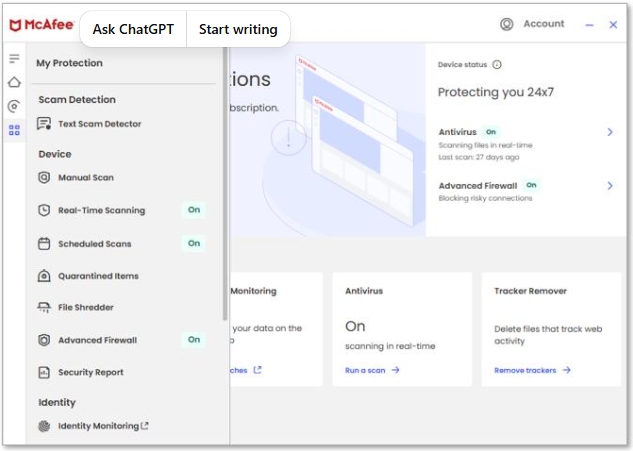
McAfee is a cybersecurity software suite designed to protect computers, smartphones, and other devices from malware, ransomware, viruses, phishing attacks, and other online threats. Founded in 1987, the company has been a well-known name in digital security for decades and continues to offer security solutions for both individuals and businesses.
Today, McAfee offers several subscription plans, with McAfee+ being its primary consumer product. Depending on the plan you choose, you can get features such as:
- Real-time antivirus protection
- Ransomware protection
- Firewall
- Web protection against malicious websites
- Secure VPN (available on eligible plans)
- Password manager
- Identity monitoring and alerts
- File shredder
- Performance optimization tools
- Protection for multiple devices, including Windows, macOS, Android, and iOS
Unlike Microsoft Defender, which comes built into Windows, McAfee aims to provide a more comprehensive security package by combining antivirus protection with privacy and identity protection features under one subscription.
For most home users, the biggest selling point is convenience. Instead of installing multiple security tools from different providers, McAfee bundles them into a single application that’s easy to manage.
However, not every feature will be useful to every user. If you only need strong malware protection, some of McAfee’s extras may go unused, making cheaper alternatives a better fit.
VisionTech HQ Take
McAfee isn’t just an antivirus anymore; it’s a complete security suite. If you’ll actually use features like the VPN, identity monitoring, and password manager, it offers good value. But if your needs are basic, paying for those extras may not be worthwhile, especially when competitors offer similar protection with fewer bundled features.
Key Features
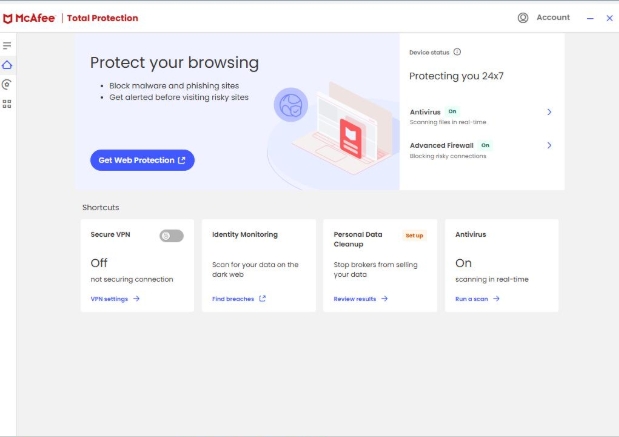
McAfee includes a comprehensive set of security and privacy tools designed to protect your devices from a wide range of online threats. Depending on your subscription plan, you’ll have access to the following features:
🛡️ Real-Time Antivirus Protection
McAfee continuously monitors your device for viruses, malware, ransomware, spyware, and other threats. It scans files as they’re downloaded, opened, or executed, helping stop malicious software before it can cause damage.
🔒 Ransomware Protection
McAfee uses behavioral detection to identify ransomware attacks and helps prevent unauthorized encryption of your personal files, adding an extra layer of security against one of today’s most dangerous cyber threats.
🌐 Web Protection
The software helps block malicious websites, phishing scams, and unsafe downloads. This feature is particularly useful when shopping online, accessing banking websites, or browsing unfamiliar pages.
🔥 Smart Firewall
McAfee’s Smart Firewall monitors incoming and outgoing network traffic to help prevent unauthorized access to your computer while giving you greater control over internet-connected applications.
🔑 Password Manager
Included with many McAfee plans, the Password Manager securely stores your login credentials and can generate strong, unique passwords for your online accounts.
🌍 Secure VPN
Selected McAfee subscriptions include a Secure VPN that encrypts your internet connection, helping protect your privacy when using public Wi-Fi or unsecured networks.
🆔 Identity Monitoring
Higher-tier plans offer identity monitoring services that notify you if your email addresses or other personal information appear in known data breaches, allowing you to act quickly.
📱 Multi-Device Protection
McAfee supports multiple platforms, including Windows, macOS, Android, and iOS. Depending on your plan, you can protect several devices under a single subscription, making it a convenient option for families or users with multiple devices.
Pros & Cons
No antivirus software is perfect, and McAfee is no exception. While it offers strong protection and a wide range of features, there are a few drawbacks worth considering before purchasing a subscription.
| Pros | Cons |
| Excellent malware and ransomware protection | More expensive than some competitors |
| Easy-to-use interface suitable for beginners | Some premium features require higher-tier plans |
| Includes useful extras like a VPN, password manager, and identity monitoring | Can use noticeable system resources during full system scans |
| Protects multiple devices across Windows, macOS, Android, and iOS | Renewal prices are often significantly higher than introductory offers |
| Regular security updates and real-time protection | Some features may be unnecessary for users who only need basic antivirus protection |
Performance & User Experience
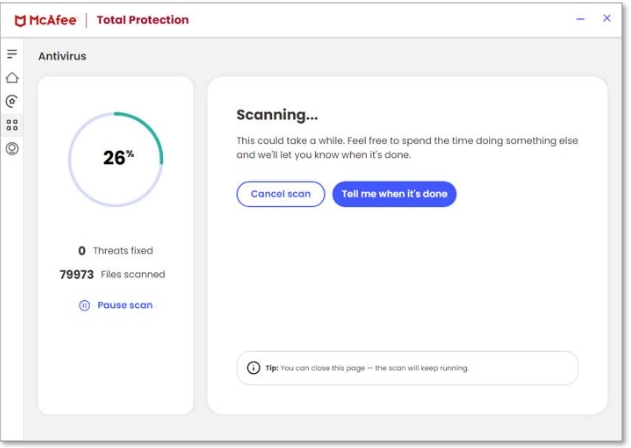
One of McAfee’s biggest strengths is that it’s designed to be easy to use, even for people with little or no technical experience. The interface is clean, well-organized, and makes it simple to run scans, check your security status, or access additional tools like the VPN and Password Manager.
Installation is straightforward, and once activated, McAfee begins protecting your device immediately. The software runs quietly in the background, automatically downloading security updates and scanning for threats without requiring much user interaction.
In day-to-day use, McAfee has little impact on system performance. Opening applications, browsing the web, streaming videos, and completing everyday tasks generally feel smooth. However, during full system scans, you may notice increased CPU and disk usage, especially on older computers with limited hardware. While this isn’t unusual for antivirus software, users with entry-level PCs may experience slower performance while scans are running.
Another advantage is McAfee’s notification system. Security alerts are clear and informative without becoming overly intrusive, helping users stay informed without constant interruptions.
VisionTech HQ Take
McAfee delivers a polished user experience that most people will appreciate. It’s easy to install, simple to navigate, and provides reliable protection without getting in the way of everyday use. Although full system scans can temporarily slow down older computers, the overall performance impact is reasonable and comparable to other leading antivirus solutions.
For most Windows users, McAfee offers a smooth balance between strong security and everyday usability.
Pricing
McAfee offers several subscription plans designed for different types of users, from individuals who need basic antivirus protection to families looking to secure multiple devices under one account. The exact features and pricing may vary depending on your region and ongoing promotions.
Generally, McAfee subscriptions include:
| Plan | Best For |
| McAfee Basic | Essential antivirus protection for individual users. |
| McAfee+ Premium | Users who want antivirus, VPN, password management, and identity monitoring. |
| McAfee+ Advanced | Individuals who want enhanced identity protection and additional privacy features. |
| McAfee+ Ultimate | Users seeking McAfee’s most comprehensive security and identity protection package. |
Another advantage is that many plans allow you to protect multiple devices including Windows PCs, Macs, Android phones, and iPhones, making them a good option for households with several devices.
VisionTech HQ Take
Check the latest McAfee price and available discounts
McAfee provides good value if you plan to use its complete security suite, including features like the VPN, password manager, and identity monitoring. However, if your primary goal is simply to protect your PC from malware, some competing antivirus products may offer similar protection at a lower long-term cost.
Who Should Buy McAfee?
McAfee is a great choice for users who want more than just antivirus software. Its combination of malware protection, privacy tools, and multi-device support makes it well-suited for individuals and families looking for an all-in-one security solution.
McAfee is a good choice if you:
- Want comprehensive protection against viruses, malware, ransomware, and phishing attacks.
- Prefer an antivirus that’s easy to install and simple to use.
- Need to protect multiple devices, including Windows PCs, Macs, Android phones, and iPhones.
- Value additional features such as a VPN, password manager, and identity monitoring.
- Want a single security suite instead of installing several separate applications.
You may want to consider other options if you:
- Only need basic antivirus protection and don’t plan to use the extra features.
- Are looking for the lowest long-term subscription cost.
- Have an older or lower-spec computer where lighter antivirus software may perform better.
- Already use dedicated services for VPN, password management, or identity protection and don’t want to pay for features you won’t use.
Overall, McAfee is best suited for users who want convenience and comprehensive protection in a single package. However, if you’re simply looking for reliable malware protection without the additional tools, there are more affordable alternatives that may provide better value for your needs.
Final Verdict
McAfee continues to be one of the strongest all-in-one security suites available in 2026. It combines excellent malware protection with useful privacy and security features, making it a dependable choice for users who want comprehensive protection without managing multiple applications.
During our review, McAfee impressed us with its strong real-time protection, user-friendly interface, and support for multiple devices. Features like the Secure VPN, Password Manager, and Identity Monitoring add value for users who want a complete security package rather than just antivirus software.
However, McAfee isn’t the perfect choice for everyone. Its renewal pricing can be considerably higher than the introductory offer, and many of its best features are reserved for higher-tier plans. If you’re only looking for basic antivirus protection, you may find better long-term value with a simpler and more affordable alternative.
For users who want a reliable, feature-rich security suite that’s easy to use and protects multiple devices, McAfee remains an excellent option. Just be sure to compare plans and renewal pricing before subscribing so you choose the one that best fits your needs.
VisionTech HQ Rating: 4.5/5
Pros
- Excellent malware and ransomware protection.
- Clean, beginner-friendly interface.
- Strong collection of security and privacy tools.
- Supports multiple devices under one subscription.
- Reliable real-time protection with regular updates.
Cons
- Renewal prices can be expensive.
- Some premium features require higher-tier plans.
- Full system scans may slow down older computers.
Should You Buy McAfee?
Yes, if you want an easy-to-use, all-in-one security suite with excellent protection and useful extra features.
Consider another option if your only goal is basic antivirus protection, as there are more affordable alternatives that may better suit your needs.
🔗 Ready to protect your devices?
Check the latest McAfee plans, pricing, and available discounts using the link below.
Frequently Asked Questions (FAQ)
Is McAfee a good antivirus in 2026?
Yes. McAfee remains one of the leading antivirus solutions in 2026, offering excellent protection against malware, ransomware, phishing attacks, and other online threats. It also includes additional features such as a VPN, password manager, and identity monitoring on selected plans.
Is McAfee better than Microsoft Defender?
It depends on your needs. Microsoft Defender provides solid built-in protection for Windows users at no extra cost. However, McAfee offers additional features such as a Secure VPN, Password Manager, identity monitoring, and multi-device support, making it a better choice for users who want a complete security suite.
Does McAfee slow down your computer?
For most modern computers, McAfee has minimal impact on everyday performance. However, you may notice slower performance during full system scans, particularly on older or lower-spec devices.
Is McAfee worth paying for?
If you’ll use its extra features and need protection across multiple devices, McAfee offers good value. However, if you’re only looking for basic antivirus protection, a free solution like Microsoft Defender or a more affordable paid alternative may be sufficient.
Can McAfee remove existing viruses?
Yes. McAfee can detect, quarantine, and remove many types of malware, including viruses, spyware, ransomware, and trojans. Running regular scans and keeping the software updated provides the best level of protection.
Does McAfee include a VPN?
Yes, but only on eligible subscription plans. The Secure VPN helps protect your privacy by encrypting your internet connection, especially when using public Wi-Fi networks.
How many devices can McAfee protect?
This depends on the subscription you purchase. Many McAfee plans support multiple devices, allowing you to protect Windows PCs, Macs, Android phones, and iPhones under a single account.
Is McAfee better than Malwarebytes?
The answer depends on what you’re looking for. McAfee is a full security suite with antivirus protection, a VPN, password manager, and identity monitoring. Malwarebytes focuses more on malware detection and removal with a lighter, more streamlined experience. Users who want an all-in-one package may prefer McAfee, while those looking for simplicity may prefer Malwarebytes.
Leave a Reply