
WinZip has been around for decades, but modern file compression software is no longer limited to simply creating and opening ZIP files. Today, WinZip combines file compression with tools for encryption, file sharing, cloud storage integration, and broader file management.
That makes it worth looking at whether WinZip still offers enough value in 2026, particularly when Windows already includes basic ZIP compression and extraction.
In this review, we look at what WinZip actually offers, its key features, usability, security options, pricing, and the types of users who are most likely to benefit from it. We’ll also consider where a simpler or different compression tool may make more sense.
Quick VisionTech Verdict
| Category | Rating |
|---|---|
| Security | ★★★★☆ |
| Ease of Use | ★★★★☆ |
| Features | ★★★★★ |
| Value for Money | ★★★☆☆ |
| Overall Rating | ★★★★☆ |
Best For: Users who want a feature-rich file compression and management tool with encryption, cloud integration, and file-sharing capabilities.
Bottom Line: WinZip goes well beyond basic file compression, but its broader feature set and paid model make it harder to justify for users who only need simple ZIP and unzip functionality.
What Is WinZip?
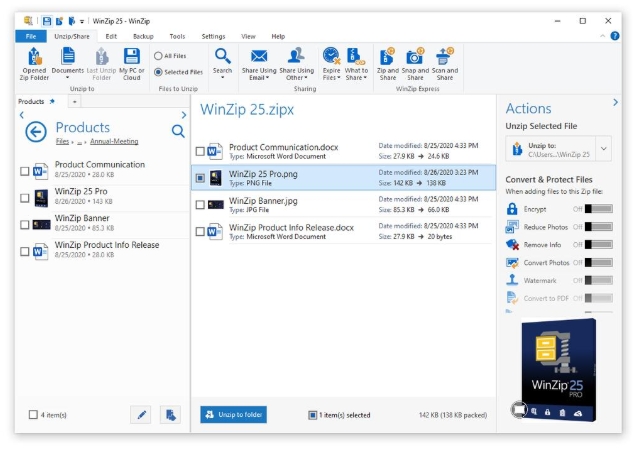
WinZip is a file compression and management utility developed by Corel Corporation. It is best known for creating and opening compressed archives, particularly ZIP files, but the current version goes considerably further than basic compression.
The software allows users to compress, extract, encrypt, protect, share, and manage files from one application. It also supports a range of archive formats and integrates with cloud services such as Dropbox, Google Drive, and OneDrive.
The main purpose of WinZip is to make working with large collections of files more convenient. Compressing files can reduce their size, making them easier to store or transfer, while features such as password protection and AES encryption are designed for users who need additional protection when sharing sensitive information.
However, WinZip is no longer simply a ZIP utility. Depending on the version and plan, it also includes features for file sharing, cloud storage, backups, PDF-related tasks, and file-management tools. That broader feature set is a major part of what differentiates WinZip from simpler compression utilities.
For someone who only needs to occasionally unzip a downloaded file or create a basic ZIP archive, many of WinZip’s additional capabilities may not be necessary. For users who regularly handle large files, need encryption and sharing tools, or want more comprehensive file-management functionality, however, those additional features are more relevant.
Key Features
WinZip’s feature set has expanded well beyond basic ZIP compression. The core functionality is still file compression and extraction, but the software also includes tools for encryption, file sharing, cloud integration, and file management.
File Compression and Extraction
At its core, WinZip lets you create compressed archives and extract files from them. It supports ZIP and ZIPX creation and can extract a broad range of formats, including RAR, 7Z, TAR, GZIP, BZ2, ISO, and others.
This is useful when you regularly receive compressed files or need to package multiple files into a single archive before sending or storing them.
For someone who only needs basic ZIP functionality, however, this feature alone may not justify paying for WinZip when operating systems already provide basic archive support.
Encryption and Password Protection
WinZip can password-protect archives and uses AES encryption for protecting files. Its security features are particularly relevant when you’re sending or storing documents containing sensitive information.
This gives WinZip a practical advantage over using an ordinary unprotected ZIP file when privacy matters. However, encryption is only useful if users also choose strong passwords and handle those passwords securely.
Cloud Storage Integration
WinZip integrates with several major cloud-storage services, including Dropbox, Google Drive, and OneDrive. This allows users to work with compressed files and move them between local storage and supported cloud services without relying entirely on separate applications.
This can be particularly useful for people who regularly share or manage files across multiple locations.
File Sharing
WinZip includes tools for sharing large files through methods such as email and cloud services. Its SafeShare functionality can combine compression, encryption, and sharing, while certain versions also support additional sharing controls.
The benefit here is convenience: instead of compressing a file with one program and then finding another service to send it, WinZip attempts to bring those steps together.
File Management
WinZip also includes file-management functionality for tasks such as moving, copying, deleting, sorting, and managing files on a computer or connected cloud storage.
This is useful for users who want more than an archive utility, although it also contributes to WinZip’s larger feature set and potentially makes the software more than some users actually need.
Backup and Additional Tools
Depending on the WinZip product or suite, users can also get features such as file backup, PDF tools, storage, duplicate-file removal, and other productivity utilities. These aren’t necessarily part of the basic WinZip experience, so it’s important to check exactly which product or plan includes a particular feature.
Our take: WinZip’s biggest strength is breadth. It can handle compression while also providing tools for security, sharing, cloud integration, and file management. The trade-off is that users looking only for straightforward ZIP compression may find much of this additional functionality unnecessary.
Pros and Cons
WinZip’s main advantage is that it has evolved into more than a basic compression utility. Its combination of archive support, encryption, cloud integration, file management, and sharing tools gives it a broader range of uses than a simple ZIP program.
At the same time, that broader approach isn’t necessarily an advantage for everyone. If your only requirement is opening or creating occasional ZIP files, much of WinZip’s feature set may be unnecessary.
Pros
- Extensive feature set — WinZip combines compression with encryption, file management, cloud integration, sharing, and additional productivity tools.
- Broad archive-format support — It can open and extract several common archive formats, including ZIPX, RAR, 7Z, LHA, BZ2, IMG, and ISO.
- Encryption and password protection — Useful for people who need to protect sensitive files before storing or sharing them.
- Cloud integration — Support for services such as Dropbox, Google Drive, and OneDrive can make managing compressed files across local and cloud storage more convenient.
- Windows integration — WinZip is designed to work with Windows 10 and Windows 11 and integrates with the native Windows experience.
Cons
- Potentially more software than basic users need — Users who only need straightforward ZIP compression may not get much practical benefit from WinZip’s additional tools.
- Not a free full-time solution — WinZip currently provides a limited trial rather than a permanently free version, so continued use requires a license.
- Some features depend on the edition — Features and capabilities vary between Standard, Pro, and Enterprise offerings, so buyers need to check which version includes the functionality they actually want.
- Broader feature set can add complexity — Although WinZip provides a simplified interface option, its large collection of file-management and productivity tools means there is more to learn than with a basic archive utility.
VisionTech HQ’s take: WinZip’s weaknesses are less about a lack of capability and more about whether you actually need all that capability. For someone who frequently works with compressed files, encrypted archives, cloud storage, and file sharing, the feature breadth can be useful. For occasional ZIP users, a simpler tool may make more sense.
Performance & User Experience
WinZip is designed primarily for Windows and currently supports Windows 10 and Windows 11 (64-bit). Its listed minimum requirements are relatively modest: a 1 GHz processor, 2 GB of RAM for 64-bit systems, and about 235 MB of disk space.
Interface and Navigation
One of WinZip’s strengths is that it is designed to integrate with the Windows environment rather than requiring users to learn an entirely separate workflow. Common compression and extraction tasks are accessible through the application’s interface and Windows integration.
For new users, WinZip also provides an interactive welcome screen intended to help them get familiar with the software.
The larger issue is that WinZip now does considerably more than simply compress and extract files. Users who only want a straightforward archive utility may find the additional file-management, sharing, cloud, and productivity features unnecessary.
Setup
Installation is relatively straightforward. WinZip’s official download process involves downloading the installer, allowing it to run, and following the setup instructions. The current Windows version requires an active internet connection for single-user licenses.
WinZip also offers a 21-day trial, giving users an opportunity to evaluate the software before purchasing a license.
Performance and Resource Requirements
WinZip’s official specifications suggest that it does not require particularly powerful hardware to run. The minimum requirements are low enough that the software should be accessible on many modern Windows computers.
However, we are not assigning specific compression or extraction speeds here, because VisionTechHQ has not independently benchmarked WinZip against competing archive utilities for this review. Claims about being exceptionally fast or delivering particular performance improvements would therefore be inappropriate.
Actual compression time and resulting file size can also vary substantially depending on the file type, compression method, hardware, and settings being used.
Overall Usability
For users who regularly work with compressed files, WinZip provides a fairly comprehensive environment for handling archives, protecting files, and working with cloud storage and sharing tools. Its broad functionality is the main reason to consider it.
The trade-off is simple: more features do not automatically mean a better experience for every user. Someone who occasionally opens a ZIP file may have little reason to use most of WinZip’s additional functionality, while a user who regularly manages archives and files may find the broader toolkit considerably more useful.
VisionTech HQ’s take: WinZip appears to be designed more for users who want a full-featured file-management and compression tool than for someone who simply needs a basic ZIP utility. Its hardware requirements are modest, but the real question is whether you will actually use the additional features you’re paying for.
Pricing
WinZip is not a permanently free compression utility. It provides a free evaluation period, after which continued use requires a paid license. WinZip’s current documentation states that the evaluation period lasts 21 days; the first 14 days provide access to Pro features, after which the evaluation is limited to Standard features.
WinZip Standard
The Standard edition focuses on the core WinZip experience, including file compression and extraction, encryption, cloud support, and file-sharing functionality. WinZip currently offers Standard as part of its subscription options.
WinZip Pro
The Pro edition adds more advanced functionality on top of the Standard feature set. Depending on the current product configuration, this includes features such as additional file-management tools, backups, automation, and advanced sharing capabilities.
WinZip Suite
WinZip also sells its products through Standard, Pro, and Ultimate Suite subscriptions. These bundles include additional products alongside WinZip itself.
- Standard Suite: WinZip Standard, WinZip Courier, and WinZip Mac Standard.
- Pro Suite: WinZip Pro, WinZip Courier, WinZip Mac Pro, and 50 GB of ZipShare storage.
- Ultimate Suite: Adds products such as WinZip System Utilities Suite and Corel PDF Fusion.
All three Suite options are subscription-based, with the subscription providing access to the included products and their updates.
What About the Price?
For this review, we’re deliberately not quoting a specific dollar or rand price because WinZip’s displayed pricing varies by region, tax, promotions, and the particular product or bundle being purchased. The official pricing pages currently show the plans as annual subscriptions billed through the relevant regional storefront.
For readers in South Africa, the safest approach is to check the current price displayed for their region immediately before purchasing rather than relying on a converted USD figure that may not match the checkout price.
Check WinZip’s current plans and pricing
Is WinZip Good Value?
This is where WinZip’s pricing becomes more difficult to evaluate.
If you regularly use compression, encryption, cloud storage, file sharing, and file-management tools, paying for WinZip can make more sense because you’re getting several functions within one product ecosystem.
If you simply need to open ZIP files or create an occasional compressed archive, the value proposition is much weaker. Windows already handles basic ZIP operations, meaning you would be paying for capabilities that you may never use.
VisionTech HQ’s take: WinZip’s paid plans make the most sense for users who will actually use its broader toolkit. For basic compression alone, paying for WinZip is difficult to justify.
Who Should Use WinZip?
WinZip makes the most sense for users who need more than basic ZIP compression. Its combination of archiving, encryption, cloud integration, sharing, and file-management features means its usefulness depends heavily on how you work with files.
Home Users Who Regularly Manage Files
Home users who frequently download, archive, transfer, or organize large collections of files may find WinZip useful. The ability to compress files, protect archives, and work with cloud storage can make routine file management more convenient.
However, if you only open the occasional ZIP file, WinZip’s additional features may not justify paying for a license.
Users Handling Sensitive Files
WinZip can be useful for people who regularly need to password-protect and encrypt archives before sharing or storing them. This can be particularly relevant when handling documents or other files that shouldn’t simply be sent as unprotected attachments.
The important distinction is that WinZip provides the tools; users still need to use appropriate passwords and security practices.
Professionals and Small Businesses
Professionals who regularly exchange collections of documents or other files can benefit from having compression, encryption, cloud integration, and sharing tools available within the same application.
For small businesses, the suitability depends on the specific workflow. Users who need only occasional ZIP files may not need a dedicated paid compression application, while teams that frequently handle archives and protected files may find the additional functionality more useful.
Users Working Across Cloud Services
WinZip can be particularly relevant if you regularly work with services such as Google Drive, OneDrive, or Dropbox. Its cloud integration is designed to make working with files across local and online storage more convenient.
Who May Want an Alternative?
WinZip isn’t necessarily the right choice for everyone.
If your main requirement is simply creating and opening ZIP files, Windows’ built-in archive functionality may already cover what you need. Likewise, users specifically looking for a lightweight archive utility may prefer software that concentrates primarily on compression and extraction rather than offering a broader collection of file-management and productivity tools.
Final VisionTech Verdict
Is WinZip Worth Using in 2026?
WinZip remains a capable file-compression and file-management application, but whether it is worth paying for depends heavily on what you expect from it.
Its biggest strength is breadth. WinZip combines archive creation and extraction with encryption, password protection, cloud integration, file sharing, and additional file-management functionality. For someone who regularly handles compressed files and wants these tools available in one application, that broader feature set can be genuinely useful.
The biggest weakness is also related to that breadth: not everyone needs it. If your main requirement is opening ZIP files or occasionally creating an archive, Windows already provides basic ZIP functionality. Paying for WinZip therefore makes less sense when most of its additional features will go unused.
The subscription model is another factor to consider. WinZip offers a 21-day evaluation period, but continued use requires a paid license. That means the value depends on whether its additional capabilities are useful enough to justify the ongoing cost. (winzip.com)
Who Should Use WinZip?
WinZip is worth considering if you:
- Regularly create and extract compressed archives.
- Need password protection and encryption for files.
- Work with multiple archive formats.
- Frequently move files between your computer and cloud-storage services.
- Want compression, file management, sharing, and related tools in one application.
Who Should Look Elsewhere?
A different solution may make more sense if you:
- Only occasionally create or open ZIP files.
- Want a simple archive utility without additional features.
- Don’t need cloud integration, file sharing, or encryption.
- Don’t want to pay for functionality that Windows or another free utility already provides.
Our Overall Assessment
WinZip isn’t simply a ZIP utility anymore. Its broader collection of compression, security, cloud, sharing, and file-management tools gives it a legitimate purpose beyond what Windows provides by default.
But more features don’t automatically make it better for every user. The software’s value depends on whether you actually need those additional capabilities. For users who do, WinZip can be a convenient all-in-one option. For basic compression needs, a simpler free solution is likely to be sufficient.
Frequently Asked Questions
Is WinZip safe to use?
WinZip is an established file-compression application that includes security features such as password protection and AES encryption. However, those features do not automatically make every archive secure; users still need to use strong passwords and obtain files from trustworthy sources.
Is WinZip free?
WinZip is not permanently free. It offers a 21-day evaluation period, after which continued use requires a paid license.
Does WinZip work with Windows 11?
Yes. WinZip currently supports Windows 11, as well as Windows 10 64-bit.
Can WinZip open RAR and 7Z files?
Yes. WinZip supports extracting several archive formats beyond ZIP, including RAR and 7Z, along with formats such as TAR, GZIP, BZ2, ISO, and others.
Does WinZip encrypt files?
Yes. WinZip provides encryption and password-protection features for archives. Its documentation describes support for AES encryption.
Does WinZip work with cloud storage?
Yes. WinZip integrates with cloud-storage services including Google Drive, OneDrive, and Dropbox, allowing users to work with files stored through supported services.
Is WinZip worth paying for?
That depends on how you use it. If you need compression alongside encryption, cloud integration, file sharing, and additional file-management tools, its broader feature set can provide useful value. If you only need to create or open occasional ZIP files, Windows’ built-in functionality may already be enough.
Is there a free alternative to WinZip?
Yes. There are free archive utilities that can handle common compression and extraction tasks. The main reason to consider WinZip instead is its broader collection of features rather than basic ZIP functionality alone.
Leave a Reply